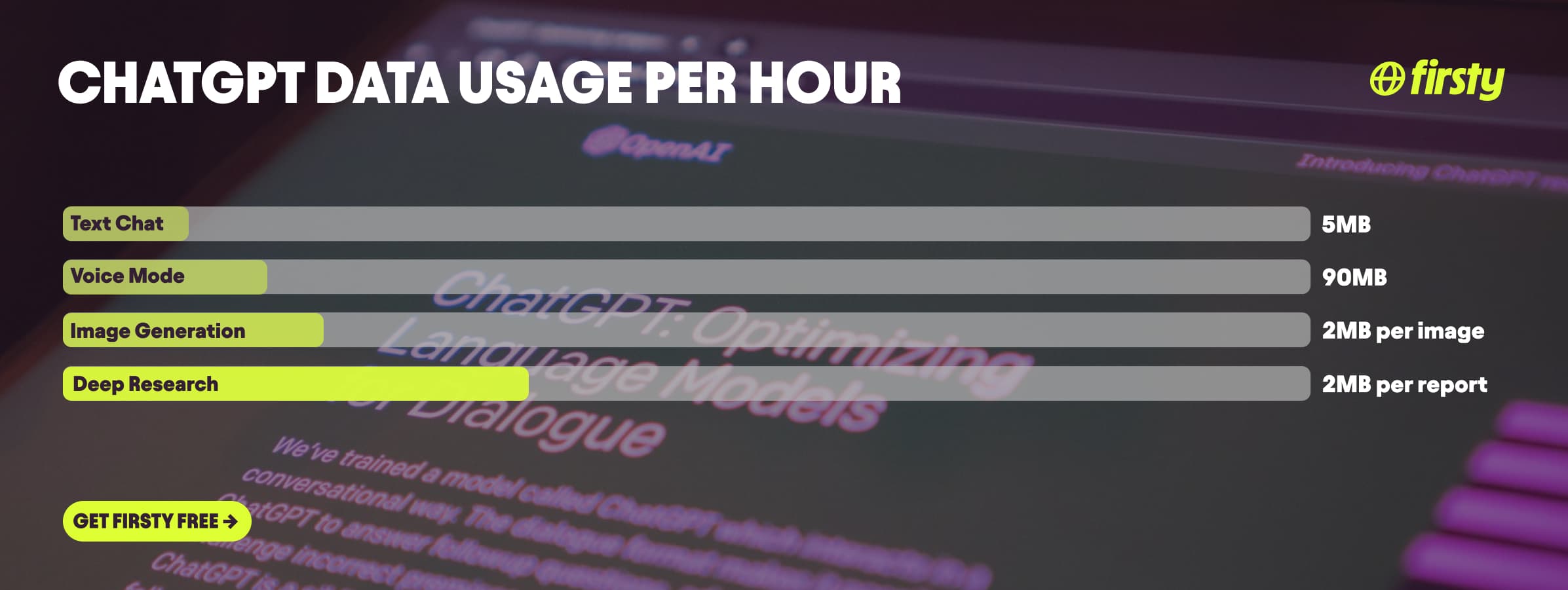
ChatGPT uses very little data. Text chatting runs about 1 to 5 MB per hour, and a single question and answer is only a few kilobytes, less than loading one webpage. The feature that actually eats data is Voice Mode, which uses roughly 1 to 2 MB per minute, or about 60 to 120 MB per hour. Generating an image costs around 1 to 2 MB each to download. So a normal text session barely registers, while an hour of talking to ChatGPT out loud uses about as much data as 20 minutes of streaming music. On 1 GB you get well over 200 hours of text chat, around 8 to 11 hours of Voice Mode, or 500 to 1,000 generated images. For most people, ChatGPT is one of the lightest apps on the phone.
The one time ChatGPT data adds up is abroad, where Voice Mode for live translation or conversation practice can quietly burn through a roaming plan. Firsty Free gives you mobile data in 185+ countries by watching a short ad, so you can use ChatGPT on the go without watching your balance.
Here is the full breakdown by activity, how far 1 GB really goes, and how to check your own usage.
On this page:
How much data does ChatGPT use per hour?
ChatGPT uses about 1 to 5 MB per hour for text chat and about 60 to 120 MB per hour for Voice Mode. Everything else sits between those two.
Activity | Data used |
|---|---|
Text chat (typing) | about 1 to 5 MB per hour |
One message exchange | a few KB |
Voice Mode (talking) | about 60 to 120 MB per hour, or 1 to 2 MB per minute |
Generating an image | about 1 to 2 MB per image |
Camera or screen share in Voice | much higher, past 250 MB per hour, like a video call |
The gap is huge because typing is just text, while talking and images are real audio and image files. If you only ever type, ChatGPT costs you almost nothing.
How much data does ChatGPT use per message?
A single ChatGPT message exchange uses only a few kilobytes, and even a long, detailed answer stays well under 100 KB. That means you could send tens of thousands of messages on 1 GB. Most of the data your phone reports against the app is the app opening, syncing, and refreshing in the background, not the words themselves.
Does ChatGPT Voice Mode use a lot of data?
Voice Mode uses about 1 to 2 MB per minute, or 60 to 120 MB per hour, which makes it the only part of ChatGPT that uses noticeable data. That is roughly streaming-music territory, and lighter than video. Standard and Advanced Voice use a similar amount. The heaviest thing ChatGPT can do is sharing your camera or screen during a voice chat, which pushes data past 250 MB per hour, the same range as a video call, so save those for wifi.
How much data does each ChatGPT feature use?
The features that sound heavy use the least of your data. Deep Research can read hundreds of web pages, and Agent Mode can browse and click around the internet for you, but all of that runs on OpenAI's servers, so your phone only downloads the finished text. What actually costs you data is the opposite: uploading your own files and photos, and downloading images or video that ChatGPT makes.
Feature | What it does | Your data cost |
|---|---|---|
Text chat | typing back and forth | about 1 to 5 MB per hour |
Voice Mode | talking out loud | 60 to 120 MB per hour |
Image generation | creates an image | about 1 to 2 MB per image downloaded |
Photo upload (vision) | you send a photo to analyze | about 1 to 5 MB per photo, up to a 20 MB cap |
File upload | you send a PDF, doc, or sheet | equal to the file size, so a 10 MB PDF uses about 10 MB |
Web search | quick browse for one answer | barely more than a normal message |
Deep Research | reads hundreds of sources for 5 to 30 minutes | almost nothing, the report arrives as text, usually under a few MB |
Agent Mode and Codex | browses, clicks, or writes code for you | runs on OpenAI's servers, light on your phone |
Camera or screen share in Voice | live video to ChatGPT | past 250 MB per hour, like a video call |
Video generation | creates a video clip | tens of MB per clip downloaded |
Canvas and data analysis | writing and code workspace | text only, very light |
How long does 1 GB of data last on ChatGPT?
On 1 GB you get well over 200 hours of text chatting, around 8 to 11 hours of Voice Mode, roughly 500 to 1,000 generated images, or about 500 Deep Research reports, since each report is only text.
What you are doing | How long 1 GB lasts |
|---|---|
Text chat | 200+ hours |
Voice Mode | about 8 to 11 hours |
Image generation | about 500 to 1,000 images |
Deep Research | about 500 reports |
Mixed everyday use | weeks |
For text-only use, 1 GB is more ChatGPT than most people get through in a month.
Why does ChatGPT use so little data?
ChatGPT uses so little data because text is tiny: your question and the answer are just words, among the lightest things you can send over a network. The heavy computing happens on OpenAI's servers, not your phone, so all your device sends and receives is text. Data only climbs when audio or images are involved, because those are far bigger files.
Use ChatGPT abroad without burning your data plan
If you are traveling or worried about your monthly data cap, there is a simpler answer than counting megabytes.
Firsty Free gives you mobile data in 185+ countries by watching short ads. Genuinely free, no payment required, no contract, no credit check.
Firsty Prepaid starts at €0.98/GB, buy data once, use it whenever. GBs never expire.
Firsty Unlimited is €2 to €3 per day or €49 per month for genuinely uncapped data. Use Voice Mode for live translation as much as you want, the megabytes are never the thing that stops you.
Most travel data plans charge you €10 to €15 per day in roaming. Your home carrier charges similar. Firsty is the alternative.
Already have Firsty? Open the app, install the eSIM, and you're connected, no number changes, no SIM swap.
How does ChatGPT compare to other apps?
ChatGPT sits at the very bottom of the data table. Text chat is lighter than music, navigation, and messaging, and only Voice Mode lifts it up to roughly the level of streaming audio. Nothing about ChatGPT comes close to video apps like YouTube or Netflix.
App | Data per hour (heavy use) | Data per hour (light use) |
|---|---|---|
ChatGPT | about 90 MB (Voice Mode) | about 5 MB (text chat) |
Snapchat | about 360 MB (Stories, Spotlight) | about 20 MB (chat only) |
TikTok | about 840 MB | about 280 MB |
Netflix | 3 GB (1080p HD) | 300 MB (Save Data mode) |
YouTube | 1.5 GB (720p) | 90 MB (144p) |
Zoom / Teams | about 1.1 GB (1-on-1 HD video) | about 50 MB (audio only) |
about 720 MB (scrolling) | n/a | |
480 MB (video call) | n/a | |
FaceTime | about 250 MB (video call) | about 30 MB (audio call) |
Spotify | 150 MB (Very High audio) | 40 MB (Normal audio) |
Google Maps | about 20 MB (satellite view) | about 5 MB (navigation) |
Want the full picture for the other apps eating your data? Check the breakdowns for YouTube, Netflix, TikTok, Instagram, FaceTime, WhatsApp, Snapchat , Spotify , Zoom, and Google Maps. ChatGPT stays lighter than all of them for everyday text use, but switch to Voice Mode for a long session and it climbs into the same range as streaming music.
How to reduce ChatGPT data usage
To reduce ChatGPT data usage, stick to text instead of Voice Mode and keep image generation on wifi. A few simple habits:
Use text instead of Voice Mode when you are on mobile data. Text is the cheapest thing ChatGPT does, by a wide margin.
Save image generation for wifi. Each image is 1 to 2 MB, and a creative session adds up fast.
Keep camera and screen share in Voice for wifi. Those are the heaviest features by far.
Screenshot or save long answers once instead of regenerating them repeatedly.
On a trip, use a data plan that does not punish you for it, like Firsty Free or Prepaid, instead of rationing megabytes.
How to check ChatGPT data usage on iPhone and Android
You can see exactly how much data ChatGPT uses in your phone settings, no extra app needed.
On iPhone: open Settings, tap Cellular or Mobile Data, scroll down to ChatGPT, and you will see its total cellular data. Reset the stats at the bottom of the page to track a single trip.
On Android: open Settings, go to Network and internet, then Mobile network or SIMs, then App data usage (the wording varies by phone), and tap ChatGPT. You can also set a data warning or limit from the same screen.
Frequently asked questions
Does ChatGPT use a lot of mobile data?
No. Text chat uses about 1 to 5 MB per hour, less than most messaging apps. The only feature that uses real data is Voice Mode, at 60 to 120 MB per hour. For normal use, ChatGPT is one of the lightest apps on your phone.
Does ChatGPT Voice Mode use more data than texting?
Yes, a lot more. Voice Mode runs about 1 to 2 MB per minute, while text is only a few KB per message. An hour of Voice Mode uses roughly the same data as 20 minutes of streaming music.
Does ChatGPT work without wifi?
Yes, ChatGPT works on mobile data and needs an internet connection to answer, because the processing happens on OpenAI's servers. It does not work fully offline. Text uses so little data that mobile is fine for nearly all use.
How much data does ChatGPT image generation use?
Each generated image is roughly 1 to 2 MB to download, so 1 GB covers around 500 to 1,000 images. If you generate a lot in one sitting, that is where the megabytes add up.
Does Deep Research use a lot of data?
No. Deep Research can read hundreds of web pages, but that browsing runs on OpenAI's servers, not your phone. Your device only downloads the finished report, which is text, usually well under a few MB even when it runs thousands of words long.
Does uploading files or photos to ChatGPT use data?
Yes, and this is the main way text-side use climbs. Uploading sends data equal to the file size, so a phone photo is a few MB and a large PDF can be 10 MB or more. Save big uploads for wifi if your data is tight.