Netflix uses about 300 MB per hour on Low (Data Saver), 700 MB per hour on SD, 3 GB per hour on HD (1080p), and 7 GB per hour on 4K Ultra HD. These figures come from Netflix's own help center. Independent testing by Android Authority measured 4K streaming between 6.5 GB and 11 GB per hour, depending on content. A two-hour movie ranges from 600 MB in Low to 14 GB in 4K. A 30-minute episode runs 150 MB to 3.5 GB depending on quality. Streaming on a hotspot uses the same data as streaming directly on your phone. Downloading an episode uses roughly the same data as streaming it at the same quality. Yes, Netflix uses a lot of data. On a 5 GB plan, HD streaming will burn through it in under two hours.
If you want to watch Netflix abroad without thinking about any of this, Firsty Free gives you mobile data in 171 countries by watching a short ad. No payment, no contract, no SIM swap. w
Below, the full per-hour breakdown, how long 1 GB of Netflix actually lasts, a comparison against other streaming apps, and how to cut Netflix's data use in half without losing much picture quality.
How much data does Netflix use per hour?
Here is the breakdown by quality setting. The per-hour numbers come from Netflix's official help center, with per-movie and per-episode totals calculated from those rates.
Quality | Per hour | Per 2-hour movie | Per 30-min episode |
|---|---|---|---|
Low (Data Saver) | 300 MB | 600 MB | 150 MB |
SD (480p) | 700 MB | 1.4 GB | 350 MB |
HD (1080p) | 3 GB | 6 GB | 1.5 GB |
4K Ultra HD | 7 GB | 14 GB | 3.5 GB |
Real usage can drift 10 to 20% either way depending on the show, scene complexity, and your connection. Android Authority's testing of 4K HDR content measured up to 11 GB per hour for action-heavy footage. Slow-paced dialogue and animation tend to use less than the published rates.
How long does 1 GB of Netflix actually last?
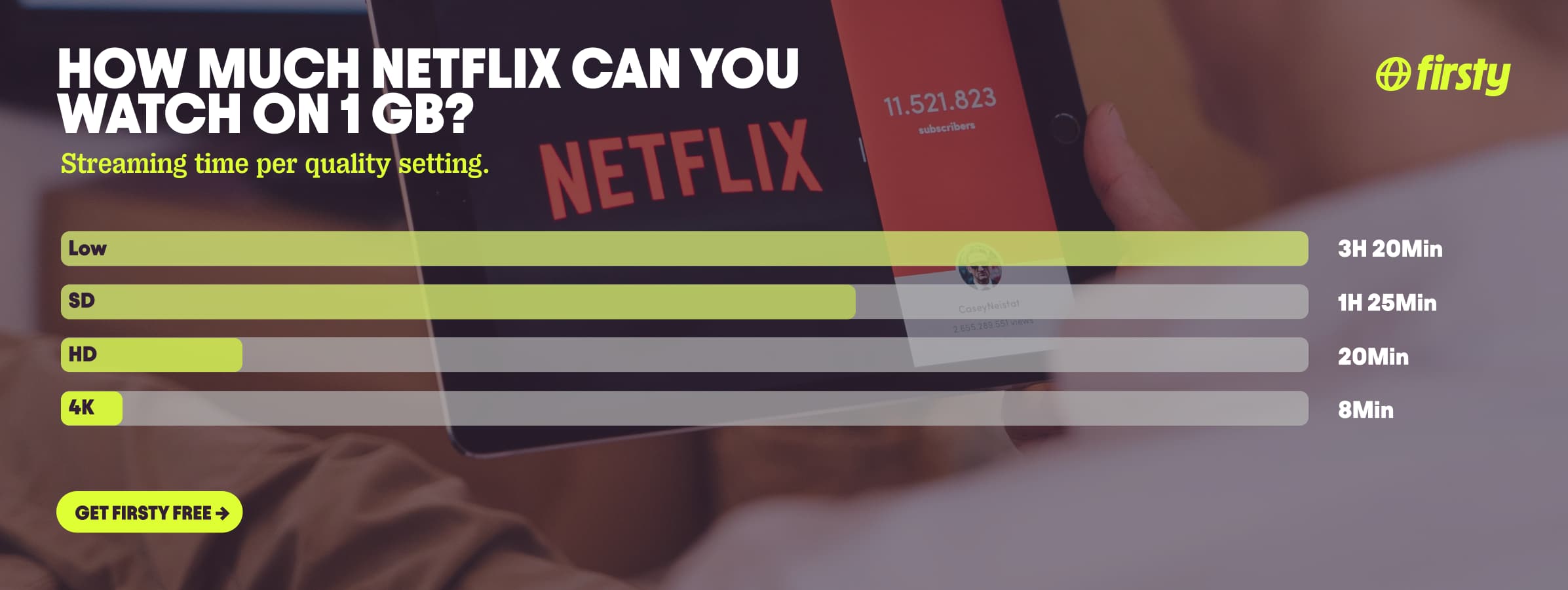
Pulling those numbers in the opposite direction, here's how far one gigabyte of mobile data stretches at each setting:
Low (Data Saver): about 3 hours 20 minutes
SD (480p): about 1 hour 25 minutes
HD (1080p): about 20 minutes
4K Ultra HD: about 8 minutes
Netflix itself frames its mobile settings the same way: roughly 6 hours of streaming per GB on Save Data, around 4 hours per GB on Automatic, and as little as 20 minutes per GB on Maximum Data.
Why does Netflix use so much data?
Higher resolution means more pixels per frame. 4K has roughly nine times the pixel count of 720p, so it needs roughly nine times more data to look right. Netflix also bumps the bitrate (how much data per second) at higher resolutions to keep the picture sharp during fast motion. Action scenes and animated content with lots of movement use more data than slow-paced dialogue, even at the same resolution.
Watch Netflix abroad without burning your data plan
If you're traveling or worried about your monthly data cap, there's a simpler answer than counting megabytes.
Firsty Free gives you mobile data in 171 countries by watching short ads. Genuinely free, no payment required, no contract, no credit check.
Classic starts at €0.98/GB, buy data once, use it whenever. GBs never expire.
Unlimited is €2 to €3 per day or €49 per month for genuinely uncapped data. Stream Netflix in HD without watching the meter.
Most travel data plans charge you €10 to €15 per day in roaming. Your home carrier charges similar. Firsty is the alternative.
Already have Firsty? Open the app, install the eSIM, and you're connected, no number changes, no SIM swap.
Netflix vs other apps
How Netflix stacks up against the apps you probably also use abroad.
App | Data per hour (heavy use) | Data per hour (light use) |
|---|---|---|
Netflix | 3 GB (1080p HD) | 300 MB (Save Data mode) |
YouTube | 1.5 GB (720p) | 90 MB (144p) |
Zoom / Teams | ~1.1 GB (1-on-1 HD video) | ~50 MB (audio only) |
TikTok | ~840 MB | ~280 MB |
~720 MB (scrolling) | n/a | |
480 MB (video call) | n/a | |
Snapchat | ~360 MB (Stories, Spotlight) | ~20 MB (chat only) |
FaceTime | ~250 MB (video call) | ~30 MB (audio call) |
Spotify | 150 MB (Very High audio) | 40 MB (Normal audio) |
Google Maps | ~20 MB (satellite view) | ~5 MB (navigation) |
Netflix in HD is the most data-hungry app most people use abroad. Switching to YouTube saves you about half. Switching to Spotify saves you 20 times over. And navigation apps barely register: 10 minutes of Netflix HD uses as much mobile data as roughly 100 hours of Google Maps navigation. Check the breakdowns for FaceTime, YouTube, TikTok, Instagram, WhatsApp, Snapchat , Spotify , Zoom, and Google Maps.
How to reduce Netflix data usage
Set playback quality to Low or Medium. Open the Netflix app, tap your profile icon, go to App Settings, tap Cellular Data Usage, choose Save Data. This caps you at roughly 300 MB per hour.
Turn off autoplay previews. Account settings on the web, Playback Settings, uncheck "Autoplay previews while browsing on all devices." Previews silently eat data every time you scroll.
Download on Wi-Fi, watch offline. Downloads use no mobile data once they're on your device. Set download quality to Standard rather than Higher to save space and download time.
Stream SD on small screens. On a phone, the difference between HD and SD is barely noticeable, but it's a 4x data saving.
Use Wi-Fi for 4K. A two-hour 4K movie is 14 GB. Almost no mobile plan handles that without pain.
Disable cellular streaming entirely. In Netflix app settings, switch "Use Wi-Fi only" on. The app will refuse to stream on mobile data, useful if you keep forgetting.
How to check Netflix data usage on iPhone and Android
iPhone: Settings → Mobile Data (or Cellular) → scroll to the app list → find Netflix. The number shows total mobile data used since the last reset.
Android: Settings → Network & Internet → SIMs (or Mobile network) → App data usage → find Netflix. You'll see a graph of daily usage plus the total for the billing period.
To track usage inside Netflix itself, open the app, tap your profile, App Settings, Cellular Data Usage. It doesn't show a meter, but it confirms which quality cap you're on.
FAQ
Does Netflix use a lot of data?
Yes. In HD, Netflix uses about 3 GB per hour, which is more than YouTube, TikTok, Spotify, and most social apps at the same quality. In 4K it uses 7 GB per hour. On a 5 GB monthly plan, HD Netflix would last under two hours.
How much data does Netflix use per hour on 4K?
About 7 GB per hour, according to Netflix's published figures. Independent testing by Android Authority measured between 6.5 GB and 11 GB per hour on 4K with HDR content, depending on the show. A two-hour 4K movie uses roughly 14 GB. Note: 4K streaming requires a Premium Netflix subscription and at least a 25 Mbps connection.
How much data does Netflix use per hour on 1080p?
About 3 GB per hour. A two-hour HD movie uses roughly 6 GB. This is Netflix's default quality on tablets, laptops, and smart TVs when bandwidth allows.
How many GB is a 2-hour movie on Netflix?
It depends on quality. 600 MB on Low, 1.4 GB on SD, 6 GB on HD, and 14 GB on 4K Ultra HD.
How much data does Netflix use on hotspot?
The same as streaming directly on your phone. Tethering doesn't add meaningful overhead. If you watch HD over a hotspot, you still use about 3 GB per hour, just out of the host phone's data allowance instead of the watching device's.
How much data does Netflix use to download an episode?
Roughly the same as streaming it at the same quality. A 30-minute Standard-quality download is around 350 MB. A 30-minute Higher-quality download is around 1.5 GB. Netflix's download quality setting is separate from playback quality, find it in App Settings → Downloads → Download Video Quality.
Does Netflix use data when watching downloads?
No. Once an episode or movie is downloaded to your device, watching it uses zero data. You only pay the data cost once, at download time.
Downloading or streaming, which uses more data on Netflix?
About the same at the same quality. A 1-hour HD download and a 1-hour HD stream both transfer roughly 3 GB. The advantage of downloading is doing it on Wi-Fi so you don't pay for mobile data later.
How much data does Netflix use on a smart TV?
Smart TVs default to the highest available quality your connection supports, so usually 3 GB per hour (HD) or 7 GB per hour (4K, if you have a Premium plan and a fast connection). You can cap this in your Netflix account settings under Playback Settings.