Utilizzo dei dati Snapchat
Snapchat è divertente, veloce e ricco di funzionalità creative. Ma se non stai attento, può anche utilizzare una quantità sorprendente di dati mobili. Che tu stia inviando snap, guardando storie o scorrendo attraverso Spotlight, la tua app Snapchat sta costantemente utilizzando dati. Se vuoi evitare costi extra o rimanere entro il tuo piano, è utile capire come funziona l'app.
Qual è l'utilizzo dei dati di Snapchat
L'uso dei dati di Snapchat include ogni snap che invii, ogni storia che visualizzi e ogni volta che apri l'app. Se non sei connesso al WiFi, l'app utilizza i tuoi dati mobili per caricare i contenuti. Questo include foto, video, chiamate vocali e messaggi. Alcune funzionalità come i filtri e Discover possono utilizzare più dati di altre.
Quanti dati utilizza Snapchat
L'importo esatto dipende da come usi l'app. Alcune azioni utilizzano solo una piccola quantità di dati, mentre altre ne utilizzano significativamente di più. Di seguito è riportata una rapida panoramica per aiutarti a controllare l'utilizzo dei dati di Snapchat per le attività comuni.
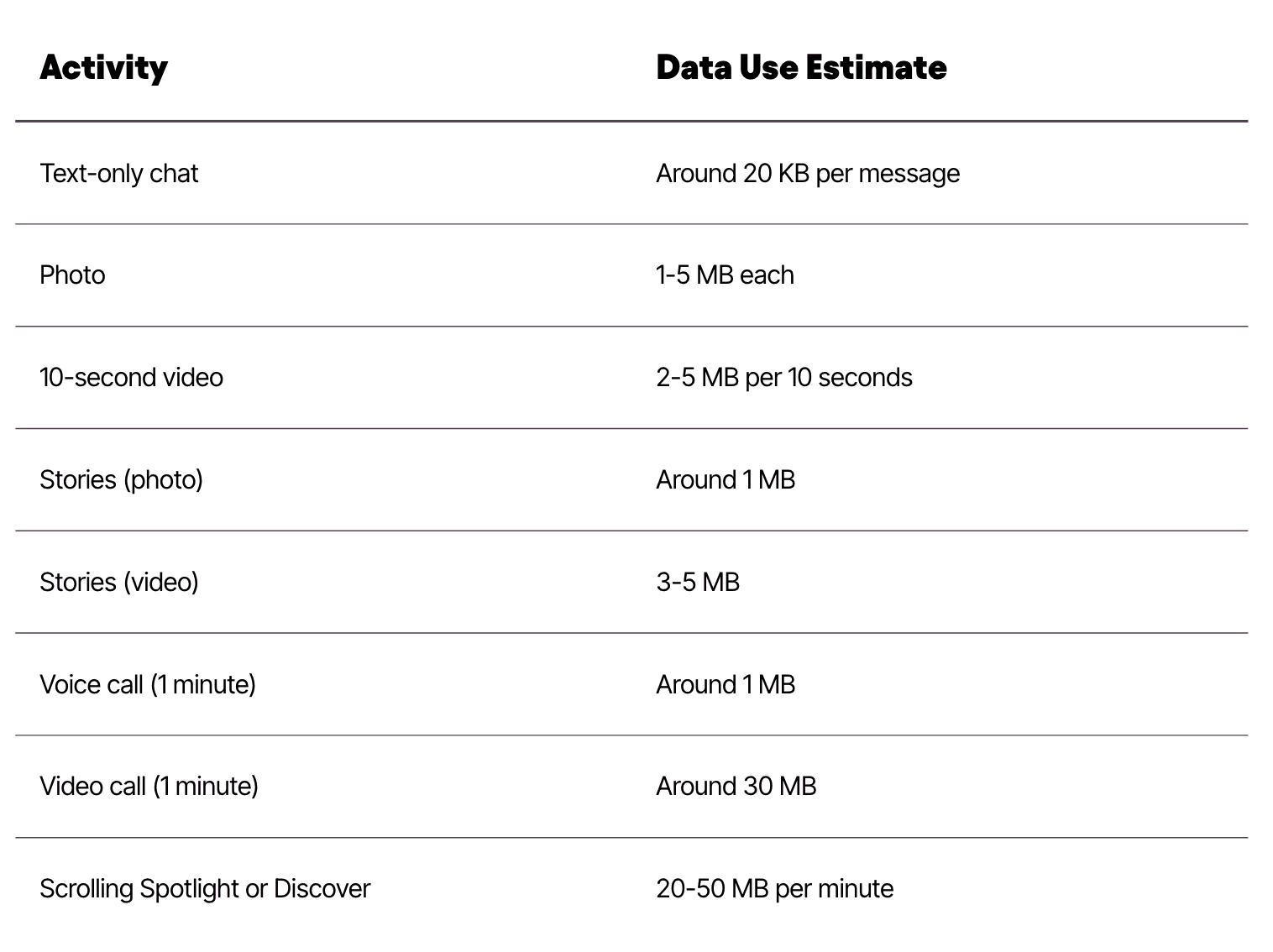
Utilizzo dei dati di Snapchat a colpo d'occhio
Come puoi vedere, Snapchat utilizza pochissimi dati per i messaggi di testo. Ma le videochiamate, Discover e lo scorrimento delle storie possono utilizzare molto di più. Se stai facendo molte di queste attività mentre usi la tua rete mobile, l'uso dei dati cellulari aumenterà rapidamente.
Cosa Influenza l'Uso della Tua App Snapchat
Diverse cose possono far sì che Snapchat utilizzi più dati. Ecco alcune comuni:
Utilizzando filtri ed effetti su ogni scatto
Guardare storie e video per intero
Scorrere attraverso Discover o Spotlight per più di qualche minuto
Invio di molte foto e video
Effettuare chiamate vocali o video nell'app
Le impostazioni del tuo dispositivo possono anche influenzare l'uso dei dati. Se a Snapchat è consentito funzionare in background, potrebbe caricare contenuti o aggiornare storie anche quando non lo stai usando.
Come utilizzare meno dati su Snapchat
Se vuoi abbassare il tuo Utilizzo dati di Snapchat, ci sono diverse impostazioni e abitudini facili che possono fare una grande differenza:
Attiva Risparmio Dati nelle impostazioni di Snapchat per impedire il caricamento automatico di storie e lenti. Questo impedisce all'app di utilizzare dati in background.
Disattiva riproduzione automatica per Storie, Spotlight e Scopri. Questo impedisce all'app di riprodurre video su cui non hai fatto tap.
Invia meno video e scatti ad alta risoluzione quando non sei connesso al WiFi.
Evita di scorrere attraverso Discover e Spotlight a meno che tu non sia su una connessione WiFi forte. Queste sezioni contengono molti video e possono consumare molti dati mobili.
Cancella regolarmente la cache nelle impostazioni di Snapchat. Questo può ridurre l'uso dei dati in background e aiutare l'app a funzionare in modo più efficiente.
Usa il WiFi ogni volta che è disponibile caricare o guardare storie e ricordi. Questo aiuta a evitare di utilizzare la rete mobile per file di grandi dimensioni.

Regolando queste impostazioni ed essendo un po' più attento a come usi l'app, puoi goderti tutto ciò che Snapchat offre senza preoccuparti di esaurire i dati.
Controlla l'utilizzo dei dati di Snapchat sul tuo dispositivo
Puoi vedere quanta dati utilizza Snapchat controllando le impostazioni del tuo telefono:
Su un dispositivo Androidvai su Impostazioni, poi Rete e Internet, poi Utilizzo dati. Da lì, seleziona App e trova Snapchat
Su iPhonevai su Impostazioni, poi su Cellulare. Scorri verso il basso per vedere Snapchat e quanto dati ha utilizzato
Questo ti aiuta a capire quanta dati utilizza Snapchat nel tempo e quando apportare modifiche.
Snapchat e Dati in Background
Snapchat potrebbe ancora utilizzare dati quando non è aperto. L'app può connettersi in background per caricare nuovi snap, storie e notifiche. Se vuoi avere più controllo, vai alle impostazioni del tuo dispositivo e gestisci l'attività delle app in background. Puoi anche impostare un avviso o un limite di dati sul tuo telefono per evitare addebiti in eccesso.
Usare Snapchat con Firsty
Snapchat ha bisogno di una connessione internet stabile per caricare contenuti, inviare messaggi e caricare storie. Con Firsty, puoi continuare a usare il App di Snapchat mentre viaggi, senza dover gestire schede SIM fisiche o costosi roaming.
Per utilizzare Snapchat con Firsty, è necessario un Comfort+ o First Class piano. Queste opzioni offrono dati mobili ad alta velocità che supportano il caricamento di video, lo scorrimento delle storie, i filtri e le videochiamate: tutto ciò che ti aspetti dalla tua esperienza su Snapchat.
Perché gli utenti di Snapchat scelgono Firsty
Usa Snapchat ovunque in 176 paesi
Carica i contenuti velocemente e resta connesso con gli amici
Trasmetti video, applica filtri e visualizza storie senza intoppi
Nessun bisogno di trovare fornitori di telefonia mobile locali
Tutto passa attraverso uno eSIM, attivato nell'app Firsty. Paghi solo per i giorni di cui hai bisogno, quindi è ideale per vacanze, viaggi zaino in spalla o fughe del fine settimana.
Che cos'è Firsty
Firsty è un servizio di connettività mobile che ti dà accesso immediato a Internet in 176 paesi utilizzando una eSIM. Nessuna scheda SIM fisica, nessun contratto e nessuna configurazione complicata. Scegli semplicemente un piano che si adatta alle tue esigenze.
Firsty Free ti dà accesso di base alle app di messaggistica come WhatsApp dopo aver guardato un breve annuncio
Comfort+ e First Class sblocca l'accesso completo ad app come Snapchat, Instagram e TikTok
Tre principali vantaggi di Firsty
Risparmia denaro evitando le spese di roaming
Pausa e riprendi i tuoi dati in qualsiasi momento
Attiva istantaneamente dal tuo telefono
Gli utenti di Snapchat amano Firsty per la sua flessibilità e facilità d'uso. Puoi gestire il tuo piano tramite l'app, monitorare l'uso dei dati mobili e controllare lo stato della tua rete senza mai visitare un negozio di telefonia mobile.
Pronto a Scatto da qualsiasi luogo? Scarica Firsty!
Dove funzionano i piani mensili Firsty
Tutti i piani mensili Firsty sono progettati come opzioni di piano dati multi-paese, offrendoti dati mobili senza interruzioni in 176 paesi. Installi la tua eSIM una sola volta, e la tua connessione ti segue da un paese all'altro senza impostazioni di roaming, sostituzioni della SIM o soste ai chioschi in aeroporto. Ovunque atterri, il tuo piano dati transfrontaliero semplicemente continua a funzionare.
Il tuo piano mensile Firsty funziona nei paesi elencati di seguito:
Albania, Algeria, Andorra, Argentina, Armenia, Australia, Austria, Azerbaigian, Bangladesh, Belgio, Bosnia ed Erzegovina, Brasile, Brunei, Bulgaria, Cambogia, Canada, Ciad, Cile, Cina, Colombia, Costa Rica, Croazia, Cipro, Repubblica Ceca, Repubblica Democratica del Congo, Danimarca, Repubblica Dominicana, Ecuador, Egitto, El Salvador, Estonia, Isole Faroe, Finlandia, Francia, Gabon, Georgia, Germania, Ghana, Gibilterra, Grecia, Guatemala, Guadalupa, Guernsey, Honduras, Hong Kong, Ungheria, Islanda, India, Indonesia, Irlanda, Israele, Italia, Giamaica, Giappone, Jersey, Giordania, Kazakistan, Kenya, Kuwait, Kirghizistan, Laos, Lettonia, Lesotho, Liechtenstein, Lituania, Lussemburgo, Macao, Madagascar, Malawi, Malesia, Malta, Martinica, Mauritius, Messico, Moldavia, Montenegro, Marocco, Nepal, Paesi Bassi, Nuova Zelanda, Niger, Nigeria, Macedonia del Nord, Norvegia, Pakistan, Paraguay, Perù, Filippine, Polonia, Portogallo, Porto Rico, Qatar, Réunion, Romania, Ruanda, Saint-Barthélemy, Saint Martin, Seychelles, Singapore, Slovacchia, Slovenia, Sudafrica, Corea del Sud, Spagna, Sri Lanka, Svezia, Svizzera, Taiwan, Tanzania, Thailandia, Tunisia, Turchia, Uganda, Ucraina, Emirati Arabi Uniti, Regno Unito, Stati Uniti, Isole Vergini Americane, Uruguay, Uzbekistan, Vietnam, Zambia.
Con copertura in Europa, in America del Nord, in America del Sud, in Asia, nel Medio Oriente, in Africa e in Oceania,Firsty Piani Mensili offrire una delle più semplici alternative di roaming globale.
A Chi Sono Più Adatti I Piani Mensili Di Firsty
Questi piani sono pensati per persone che hanno bisogno di più di una semplice eSIM per le vacanze.
Sono perfetti se tu:
Viaggia internazionalmente ogni mese.
Vivi all'estero e hai bisogno di unAbbonamento eSIM per espatriati.
Lavora da remoto da diversi paesi.
Stanno costantemente facendoconfronto dei piani mobili internazionali e vogliono una soluzione che funzioni e basta.
Sei stanco di destreggiarti con SIM locali o di ricaricare ogni pochi giorni.
Vuoi unservizio di dati mobili in abbonamento puoi iniziare e fermarti a tuo piacimento.
Se passi più tempo a calcolare i costi di roaming e a comprare nuovi piani che a goderti davvero il viaggio, Firsty’seSIM da viaggiopiano mensile è fatto per te.
Come funzionano la fatturazione, il rinnovo e la cancellazione
Come funziona la fatturazione
Tu scegli uno deipiani dati mensili 2025 (Economy, Comfort+ o Prima Classe) nel Firsty app.
Il tuo abbonamento inizia immediatamente dopo l'acquisto.
Ti viene addebitato una volta al mese utilizzando il metodo di pagamento scelto.
Puoi cambiare piano o cancellare prima del tuo prossimo rinnovo. Non c'è un contratto a lungo termine.
Rinnovo automatico
Per mantenere il tuoabbonamento dati internazionale attivo, il tuo piano si rinnova automaticamente ogni mese. Ciò significa nessuna disconnessione improvvisa nel mezzo del tuo viaggio.
Se la tua carta non funziona o il tuo metodo di pagamento cambia, riceverai una notifica e potrai risolverlo rapidamente nell'app.
Cancellazione
Hai sempre il controllo. Puoi:
Annulla il tuopiano mensile eSIM globale in qualsiasi momento nell'app
Passa a un piano più piccolo se usi meno dati
Aggiorna aPrima Classe se diventi un utente pesante
Nessuna penale, nessun vincolo a lungo termine. Una volta che cancelli, il tuo piano rimane attivo fino alla fine del ciclo di fatturazione in corso.
In Che Modo I Piani Mensili Differiscono Dai Piani Giornalieri Firsty
Se conosci già Firsty dalle nostre opzioni di utilizzo quotidiano, potresti chiederti riguardopiani mobili prepagati vs piani in abbonamento.
Ecco la differenza principale:
Ottimo per brevi viaggi
Paghi al giorno o per un pacchetto dati specifico
Una volta che finisce, compri di nuovo
Ideale per viaggi ricorrenti o a lungo termine
I dati si rinnovano automaticamente ogni mese.
Non è necessario acquistare continuamente nuovi piani
Se viaggi spesso e continui a comprare piani giornalieri, passare a unpiano eSIM mensile è solitamente più comodo e può far risparmiare denaro nel tempo, soprattutto se stai usandoPrima Classe oConforto+ pesantemente.
Dati, velocità e uso equo
OgniPiano Mensile Firsty ti fornisce una quantità specifica di dati ad alta velocità:
Economia: 1.5 GB
Comodità+: 10 GB
Prima Classe: 40 GB ad alta velocità + illimitato a velocità ridotta a 512 Kbps
Una volta esauriti i tuoi dati ad alta velocità:
Economia eComodità+ si fermerà fino al tuo prossimo ciclo o fino a quando non acquisti dati aggiuntivi
Prima Classe continuerà a velocità ridotta così non sarai mai completamente disconnesso
Questo approccio mantiene l'esperienza equa per tutti e permettePrima Classe funzione come un praticopiano mensile con dati illimitati per viaggiare e lavorare da remoto.
Puoi sempre controllare il tuo utilizzo dei dati nell'app in modo da non avere mai sorprese.
Hotspot e Tethering
L'utilizzo dell'hotspot è disponibile suPrima Classe piano.
Questo significa che puoi:
Condividi la tua connessione con il tuo laptop o tablet
Lavora da un caffè, da un treno o da un hotel usando il tuo telefono come router
Supportare più dispositivi durante il tuo viaggio
Economia eComodità+ non includere hotspot, rendendoli più efficienti ed economici per un utilizzo più leggero su un singolo dispositivo.
Se l'hotspot è essenziale per il tuo lavoro,Prima Classe è il miglioreservizio di dati mobili in abbonamento opzione per te.
Come iniziare con i piani mensili di Firsty
Iniziare è semplice e richiede solo pochi minuti.
Verifica la compatibilità del dispositivo
Assicurati che il tuo telefono supporti l'eSIM e sia sbloccato dall'operatore.Scarica l'app Firsty
Disponibile per iOS e Android. Questo è dove gestisci il tuoabbonamento dati mobili per i viaggiatori.Scegli il tuo piano mensile
ScegliEconomia,Comodità+, oPrima Classe a seconda delle tue esigenze di dati e del budget.Installa la tua eSIM
Segui le istruzioni passo dopo passo nell'app. Lo fai solo una volta.Attiva e inizia a utilizzare i dati
Non appena la tua eSIM è attiva, puoi iniziare a usarla, sia a casa che all'estero. Funzionerà in tutti i paesi supportati come la tuapiano dati multi-paese.
FAQ rapide
Posso mantenere il mio numero normale?
Sì. Puoi tenere la tua SIM fisica per le chiamate e gli SMS.Prima di tutto gestisce i tuoi dati.Posso usarlo in più paesi in un mese?
Sì. È esattamente quello che ilpiano dati transfrontaliero è progettato per.È questo un contratto?
No. È unpiano eSIM mensile flessibile con rinnovo automatico che puoi annullare in qualsiasi momento.Posso usare Firsty come mia unica fonte di Internet?
Molti utenti fanno con ilPrima Classe piano. Se trasmetti molto in streaming e lavori da remoto, First Class è la scelta migliore.
Considerazioni finali
Firsty Piani Mensili sono progettati per rendere i viaggi a lungo termine, il lavoro da remoto e la mobilità transfrontaliera il più semplice possibile. Che tu abbia bisogno di un abbonamento eSIM conveniente per l'uso quotidiano o di un piano dati mensile flessibile per viaggi in più paesi, la tua connessione ti accompagna ovunque tu vada.
Se hai ancora domande o riscontri problemi, il nostro team è qui per aiutarti.
Puoi contattarci direttamente tramiteInnanzitutto la sezione Support dell'app o inviaci un'email in qualsiasi momento asupport@firsty.app.
Scegli un piano, installa la tua eSIM una volta, e lasciaInnanzitutto gestisci la connessione mentre ti concentri sulle parti divertenti del viaggio.
- 1Quanti dati utilizza Snapchat?
- 2Cosa Influenza l'Uso della Tua App Snapchat?
- 3Usare Snapchat con Firsty
- 4Dove Funzionano I Piani Mensili Di Firsty
- 5Per Chi Sono Migliori I Piani Mensili Di Firsty
- 6Come funzionano la fatturazione, il rinnovo e la cancellazione
- 7In che modo i piani mensili sono diversi dai piani Firsty Daily
- 8Dati, Velocità e Uso Corretto
- 9Hotspot e Tethering
- 10Come iniziare con i piani mensili di Firsty
- 11FAQ rapide
- 12Considerazioni finali