
Instagram uses around 100 to 200 MB of data per hour when you're scrolling the feed, but that number climbs fast once Reels, Stories, and video calls enter the mix. Heavy Reels watching can push past 1 GB per hour, and a video call can burn through your data plan in minutes. If you're on mobile data, especially while travelling, knowing how much Instagram actually uses can save you from a nasty bill at the end of the month.
This guide breaks down Instagram data usage per hour by activity, explains why the app eats more data than you'd expect, and shows you how to cut it down without giving up the app.
If you use Instagram while traveling, that data comes out of a roaming plan, which is where it gets expensive fast. Firsty gives you mobile data in 185+ countries, and the free plan costs nothing as long as you watch a short ad now and then.
Does Instagram use a lot of data?
Compared to messaging apps or basic browsing, yes. Instagram is a media-heavy platform built around images, autoplay video, and live content. Every time you scroll, the app loads new photos, preloads Reels, and refreshes Stories in the background. That adds up quickly, especially on a fast connection where the app defaults to higher-quality media.
Light users who mostly check Stories and DMs can get through an hour on roughly 100 MB. Anyone watching Reels or going live regularly will see numbers several times higher.
How much data does Instagram use per hour by activity?
Instagram data usage depends entirely on what you're doing inside the app. Here's a breakdown of average usage by activity:
| Activity | Data usage |
|---|---|
| Scrolling the feed | 100 to 200 MB per hour |
| Watching Stories | 150 to 300 MB per hour |
| Watching Reels | 600 MB to 1.5 GB per hour |
| Watching Instagram Live | 700 MB to 1.2 GB per hour |
| Voice calls | 30 to 50 MB per hour |
| Video calls | 250 to 500 MB per hour |
| Posting a photo | 2 to 5 MB per upload |
| Posting a Reel or video | 20 to 100 MB per upload |
Reels is by far the biggest data eater. Because Reels autoplay one after another and load at high resolution by default, an hour of casual Reels watching can use as much data as a short Netflix episode.
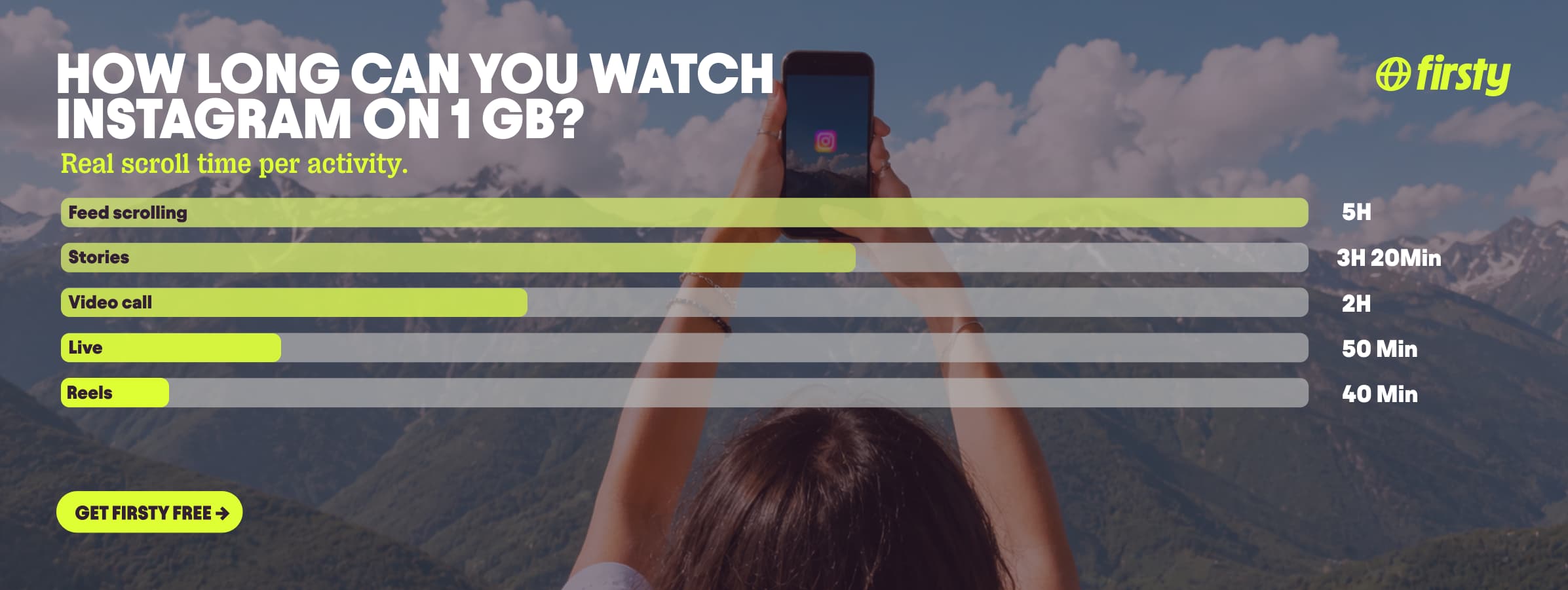
How much data does Instagram Reels use?
Reels deserves its own breakdown because it behaves differently from the rest of the app. Where the feed shows you a mix of photos and short videos, Reels is pure full-screen video that autoplays continuously until you close the app.
Here's how Reels data usage adds up over time on a standard mobile connection:
| Time spent on Reels | Data used |
|---|---|
| 1 minute | 10 to 25 MB |
| 10 minutes | 100 to 250 MB |
| 30 minutes | 300 to 750 MB |
| 1 hour | 600 MB to 1.5 GB |
| 2 hours | 1.2 to 3 GB |
The range comes down to two things: video quality and how long each Reel is. On a fast 4G or 5G connection, Instagram serves Reels in higher resolution, which means more data per minute. On a slower connection, the app drops the quality automatically. The "Use less mobile data" setting also lowers Reels quality significantly, which is the fastest way to cut Reels data usage without leaving the app.
Scroll Instagram unlimited abroad without burning your data plan
If you're traveling or worried about your monthly data cap, there's a simpler answer than counting megabytes.
Firsty Free gives you mobile data in 185+ countries by watching short ads. Genuinely free, no payment required, no contract, no credit check.
Firsty Prepaid starts at €0.98/GB, buy data once, use it whenever. GBs never expire.
Firsty Unlimited is €2 to €3 per day or €49 per month for genuinely uncapped data. Long FaceTime calls, group calls, HD video on 5G, none of it touches a cap.
Most travel data plans charge you €10 to €15 per day in roaming. Your home carrier charges similar. Firsty is the alternative.
Already have Firsty? Open the app, install the eSIM, and you're connected. No number changes, no SIM swap.
Instagram vs other social media apps
How does Instagram compare to other apps on your phone? Here's an average per-hour breakdown across the main social platforms:
| App | Data per hour (HD) | Data per hour (low quality) |
|---|---|---|
| YouTube | 1.5 GB (720p) | 90 MB (144p) |
| Netflix | 3 GB (1080p) | 300 MB (Save Data mode) |
| TikTok | ~840 MB | ~280 MB |
| Spotify | 150 MB (Very High audio) | 40 MB (Normal audio) |
| WhatsApp video call | 480 MB | n/a |
| Instagram scrolling | ~720 MB | n/a |
Short-form video apps like Reels and TikTok consume far more data than text-heavy platforms like Spotify or WhatsApp chats. If you spend most of your phone time on Reels, TikTok, or YouTube, those three apps are doing the heavy lifting on your data plan.
Why does Instagram use so much data?
The short version: Instagram is built around video. Even if you think you're "just scrolling," the app is constantly preloading the next few Reels and Stories so they play instantly when you swipe. That preloading happens in the background and counts against your data.
A few other things drive Instagram's data consumption higher than people expect:
Autoplay video in the feed, even when sound is off
Higher-resolution media on faster connections
The "Upload at highest quality" setting, which doubles the data used when you post
Background refreshing of new posts, notifications, and DMs
The faster your connection, the more data Instagram will pull, because the app defaults to better quality whenever it can.
How to reduce Instagram data usage
You don't have to delete the app to keep your data in check. Instagram has a built-in Data Saver toggle, and combining it with a few habits makes a real difference.
1. Turn on Data Saver inside Instagram
This is the single biggest fix. Data Saver stops Instagram from preloading videos in advance and lowers the default media quality on mobile data.
To turn it on:
Open Instagram and go to your profile
Tap the menu icon (three lines) in the top right
Scroll down to Your app and media
Tap Data usage and media quality
Toggle on Use less mobile data
2. Disable "Upload at highest quality"
In the same Data usage menu, switch off the high quality upload setting. Posts and Reels will compress before uploading, which can cut your upload data by half or more.
3. Watch Reels and videos on Wi-Fi when possible
Reels are the heaviest part of Instagram. If you save your Reels binge sessions for when you're on Wi-Fi, your mobile data lasts much longer.
4. Use your phone's data saver mode
Both iPhone and Android let you restrict background data app by app, which stops Instagram from refreshing when you're not using it.
How to check Instagram data usage on your phone
iPhone: Go to Settings → Mobile Data (or Cellular in the US and Canada), scroll down to the app list, and find Instagram. You'll see total mobile data used since your last reset.
Android: Go to Settings → Network & internet → Mobile network → App data usage. Find Instagram in the list to see how much it's pulled over your chosen time period. The exact path can vary depending on your phone manufacturer.
Checking this once a week is the easiest way to spot when usage spikes, usually after a long Reels session you didn't realise was that long.
Frequently asked questions
How much data does Instagram use per minute?
Roughly 2 to 4 MB per minute for normal feed scrolling, and 10 to 25 MB per minute when watching Reels. Video calls sit around 5 to 8 MB per minute.
How much data does a 1-hour Instagram video call use?
An Instagram video call uses approximately 250 to 500 MB per hour, depending on the video quality and how stable your connection is. Voice-only calls are far lighter at 30 to 50 MB per hour.
Does Instagram use data when you're not using the app?
Yes, a small amount. Instagram refreshes notifications, DMs, and new posts in the background. It's usually under 50 MB per day, but turning off background app refresh in your phone settings stops it completely.
Does Instagram use more data than TikTok?
No, not when comparing total app usage. TikTok is pure full-screen video with aggressive preloading, so an hour of TikTok generally uses more data than an hour of mixed Instagram use. An hour of Reels alone, though, matches TikTok almost megabyte for megabyte.
Does Instagram use Wi-Fi or mobile data?
Instagram uses whichever connection your phone is currently on. If you're connected to Wi-Fi, it uses Wi-Fi. The moment you leave Wi-Fi range, it switches to mobile data automatically unless you turn off mobile data for the app in your phone settings.
How can I stop Instagram from using so much data?
Turn on Use less mobile data inside Instagram's settings under Data usage and media quality. This stops video preloading and lowers media quality on mobile data. Combine it with disabling the "Upload at highest quality" setting for the biggest impact.


