
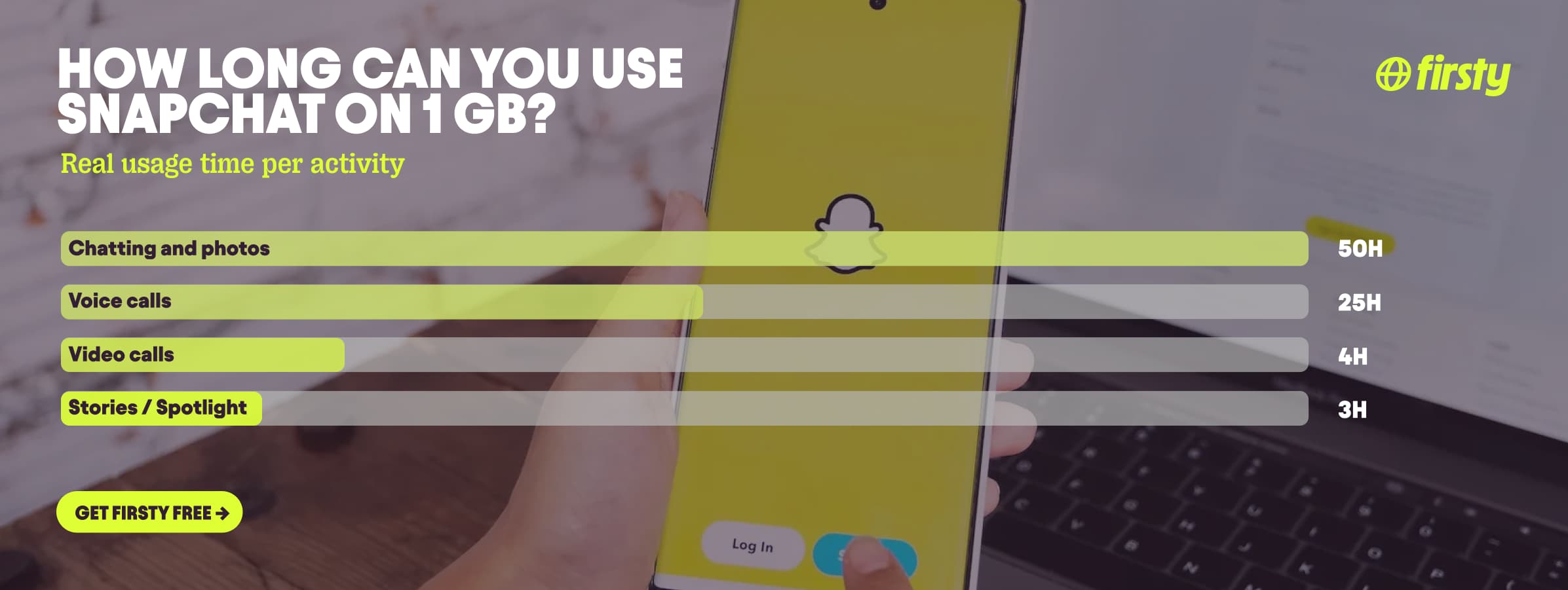
Snapchat uses about 20 MB per hour for casual use, meaning chatting and sending photo snaps. That jumps to around 360 MB per hour once you start scrolling Stories, Spotlight, or Discover, because those feeds are full of video. The quick version: a text message uses roughly 20 KB, a photo snap about 1 MB, and a 10-second video snap around 5 MB. Calls are the heaviest activity. A video call uses roughly 250 MB per hour, and a voice call uses about 30 to 45 MB per hour. So a light user might go through 100 to 200 MB in a day, while someone who lives in Spotlight can easily pass 1 GB. The real number depends on how much video you watch and send, and whether Data Saver is switched on.
If you use Snapchat while traveling, that data adds up fast on roaming. Firsty Free gives you mobile data in 185+ countries just for watching a short ad, so you can keep snapping abroad without paying a cent.
Below is the full breakdown by activity, how Snapchat stacks up against other apps, and the settings that cut your usage roughly in half.
How much data does Snapchat use per hour?
It depends almost entirely on whether you are looking at video. Text and photos are light. Video, whether you are watching it in Stories and Spotlight or sending it in a call, is where the data goes. Here is the breakdown by activity:
| Activity | Data used |
|---|---|
| Text chat message | ~20 KB per message |
| Photo snap | ~1 MB each |
| Video snap (10 seconds) | ~5 MB |
| Casual use (chatting and photos) | ~20 MB per hour |
| Scrolling Stories, Spotlight, or Discover | ~360 MB per hour |
| Voice call | ~30 to 45 MB per hour |
| Video call | ~250 MB per hour |
Sending 50 text-only messages uses about 1 MB, which is nothing. An hour of scrolling Spotlight uses the same data as roughly 360 photo snaps. And 360 MB is only the average for mixed Story and Spotlight viewing. If you scroll Spotlight rapidly on a fast 5G connection, the app auto-buffers the next clips and you can burn over 1 GB in a single hour. That gap is the whole story of Snapchat data usage.
Why does Snapchat use so much data?
Snapchat looks like a messaging app, but it behaves like a video app. Almost everything you do loads media: friends' Stories autoplay one after another, and Spotlight and Discover are wall-to-wall video. AR lenses add another quiet cost. Each new lens you try downloads its 3D assets, and a complex one can be several MB, so swiping through the lens carousel burns data even when you are only sending photos. Once a lens is cached on your phone, reusing it costs almost nothing, so the drain comes from browsing lots of new lenses, not from using your favourite one. The app also preloads content in the background so it feels instant, which uses data before you have even tapped anything. None of this matters much on wifi. The moment you switch to mobile data and start watching video, the usage climbs quickly.
Use Snapchat abroad without burning your data plan
If you are traveling or worried about your monthly data cap, there is a simpler answer than counting megabytes.
Firsty Free gives you mobile data in 185+ countries by watching short ads. Genuinely free, no payment required, no contract, no credit check.
Classic starts at €0.98/GB, buy data once, use it whenever. GBs never expire.
Unlimited is €2 to €3 per day or €49 per month for genuinely uncapped data. Scroll Spotlight, send video snaps, and take video calls all day without watching the counter.
Most travel data plans charge you €10 to €15 per day in roaming. Your home carrier charges similar. Firsty is the alternative.
Already have Firsty? Open the app, install the eSIM, and you're connected, no number changes, no SIM swap.
How does Snapchat compare to other apps?
Snapchat sits in the middle. Heavier than music streaming and navigation, lighter than full-screen video apps like YouTube and Netflix, but it climbs fast once you treat it like one.
| App | Data per hour (heavy use) | Data per hour (light use) |
|---|---|---|
| Snapchat | ~360 MB (Stories, Spotlight) | ~20 MB (chat only) |
| TikTok | ~840 MB | ~280 MB |
| Netflix | 3 GB (1080p HD) | 300 MB (Save Data mode) |
| YouTube | 1.5 GB (720p) | 90 MB (144p) |
| Zoom / Teams | ~1.1 GB (1-on-1 HD video) | ~50 MB (audio only) |
| ~720 MB (scrolling) | n/a | |
| 480 MB (video call) | n/a | |
| FaceTime | ~250 MB (video call) | ~30 MB (audio call) |
| Spotify | 150 MB (Very High audio) | 40 MB (Normal audio) |
| Google Maps | ~20 MB (satellite view) | ~5 MB (navigation) |
Want the full picture for the other apps eating your data? Check the breakdowns for YouTube, Netflix, TikTok, Instagram, Spotify, WhatsApp, FaceTime, Zoom, and Google Maps. Snapchat stays lighter than the video-heavy ones for everyday chatting and photos, but a long Spotlight session closes the gap fast.
How to reduce Snapchat data usage
A few settings make a big difference, especially on mobile data or abroad:
Turn on Data Saver in Snapchat settings. This stops Stories and lenses from loading automatically and can cut your usage by roughly half.
Turn off autoplay for Stories, Spotlight, and Discover so videos only load when you tap them.
Save Story uploads and Memories backups for when you are on wifi, since those are large files.
Avoid scrolling Spotlight and Discover on mobile data. These are the most video-heavy parts of the app.
Keep video calls on wifi when you can. At 250 MB per hour, they are the single heaviest thing you can do.
Turn off background app refresh for Snapchat in your phone settings so it stops loading content when you are not using it.
Clear the app cache now and then to keep Snapchat running efficiently.
How to check Snapchat data usage on iPhone and Android
On iPhone: go to Settings, then Cellular, scroll down to Snapchat, and you will see how much data it has used. One catch: iPhones do not reset this number automatically, so it shows your total since you last reset it, not this month. Scroll to the bottom of the Cellular screen and tap Reset Statistics to track usage for a specific trip or billing cycle.
On Android: go to Settings, then Network and Internet, then Data Usage, tap App data usage, and find Snapchat in the list. Android lets you set a billing cycle, so this count can reset itself each month.
This shows you exactly how much data Snapchat has used, so you know when to flip on Data Saver or hold off until wifi.
FAQ
Does Snapchat use a lot of data?
It can, but only when you watch video. Chatting and sending photo snaps uses about 20 MB per hour, which is light. Scrolling Stories and Spotlight pushes that to around 360 MB per hour, and video calls hit roughly 250 MB per hour. If you stick to messages and photos, Snapchat is one of the lighter social apps.
Does Snapchat work without wifi or internet?
No. Snapchat needs an internet connection to send snaps, load Stories, and make calls. Without wifi it uses your mobile data instead. You can still view already-downloaded snaps and Memories offline, but anything new requires data or wifi. This is why a data plan matters if you want to use Snapchat while traveling.
How much data does a Snapchat video call use?
A Snapchat video call uses roughly 250 MB per hour, which makes it the most data-hungry thing in the app. A voice call is far lighter at about 30 to 45 MB per hour. If you are on a limited plan or abroad, keep video calls on wifi where possible.
How much data does Snapchat use per snap?
A text message uses about 20 KB. A photo snap uses roughly 1 MB, and a 10-second video snap uses around 5 MB. A snap with a heavy AR lens can run higher the first time you use that lens, since it downloads 3D assets. The takeaway: individual snaps are cheap, and it is video viewing, not sending, that drains your data.
Can you use Snapchat abroad for free?
Yes, with Firsty Free you get mobile data in 185+ countries just for watching a short ad, so you can send snaps and check Stories abroad without roaming charges. For heavy use like Spotlight scrolling or video calls, Classic from €0.98/GB or Unlimited gives you the speed and headroom without the daily roaming fees most carriers charge. Get Firsty Free
Why is Snapchat using so much storage?
Storage and data are different things. Data is what you use to load content over the network, while storage is space on your phone. Snapchat eats storage mainly through its cache and saved Memories. To free it up, go to Snapchat settings, then Account Actions or Storage, and clear the cache. This does not delete your Memories or chats.
Does Snapchat charge for international calls?
No. Snapchat calls travel over the internet, not your phone network, so there is no per-minute or international charge from Snapchat itself. The only cost is the data the call uses, about 250 MB per hour for video and 30 to 45 MB for voice. As long as you have data or wifi, calling a friend in another country costs the same as calling next door.


