
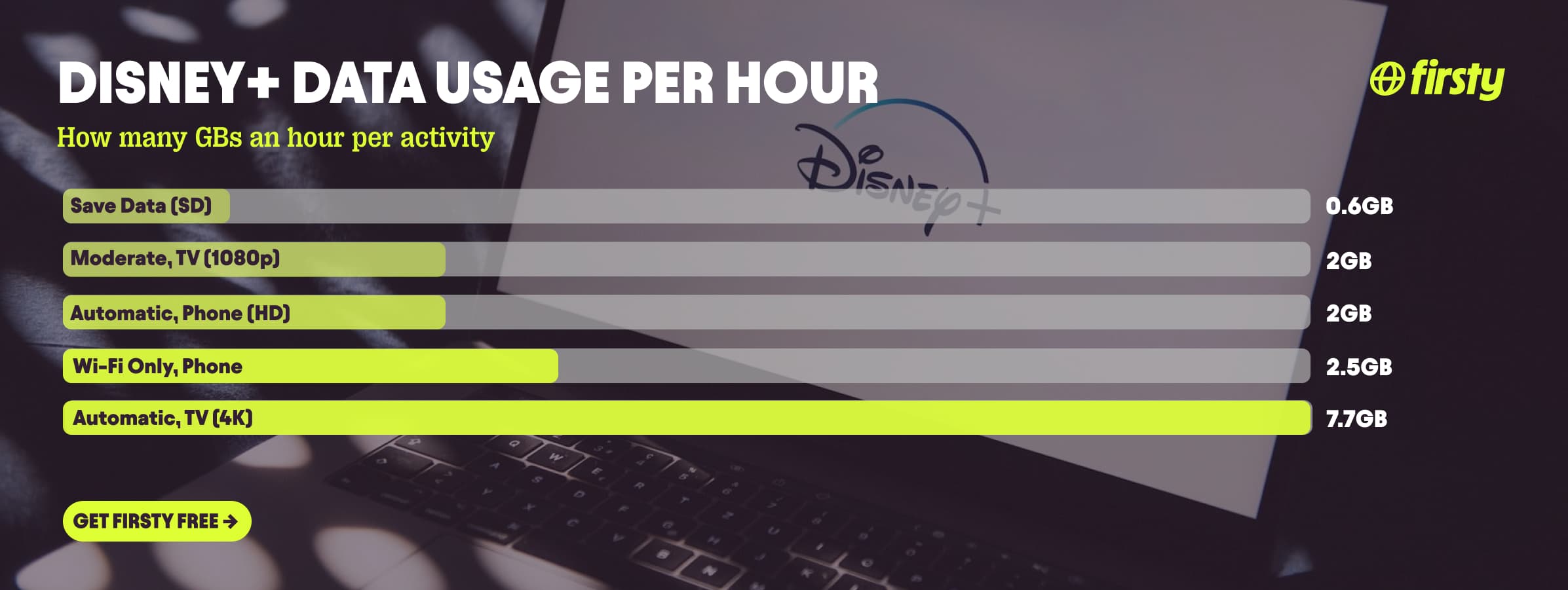
Disney+ uses about 2 GB of data per hour in HD on your phone, and up to 7.7 GB per hour in 4K on a TV. On its lowest Save Data setting it drops to roughly 0.6 GB per hour. The exact number depends almost entirely on two things: the quality setting you pick and the device you watch on. Here is the quick version. On a phone or tablet, Disney+ caps at HD, so even the default Automatic setting uses around 2 GB per hour, and Save Data brings that down to about 0.6 GB. On a TV or streaming box, Automatic streams up to 4K and burns about 7.7 GB per hour, while the Moderate setting holds it near 2 GB. That means one hour of 4K on your TV uses more data than a whole evening of HD streaming on your phone.
If you are traveling and Disney+ is going to live on your phone, that data adds up fast, especially on roaming. Firsty Free gives you mobile data in 185+ countries just for watching a short ad, so you can keep streaming without watching the meter.
Below is the full breakdown by quality and device, how long 1 GB really lasts, how Disney+ compares to other apps, and how to cut your usage.
On this page
How much data does Disney+ use per hour?
Disney+ uses about 2 GB per hour in HD and up to 7.7 GB per hour in 4K, with Save Data dropping it to around 0.6 GB per hour. The setting you pick and the device you watch on decide which number you land on. Here is every option Disney+ gives you and what each one costs per hour.
| Setting | Where it applies | Quality | Data per hour |
|---|---|---|---|
| Save Data | Phone, tablet | SD | ~0.6 GB |
| Automatic (default) | Phone, tablet | up to HD | ~2 GB |
| Stream over Wi-Fi only | Phone on Wi-Fi | highest available | ~2.5 GB |
| Save Data | TV, streaming box | SD | ~0.7 GB |
| Moderate | TV, streaming box | up to 1080p | ~2 GB |
| Automatic (default) | TV, streaming box | up to 4K | ~7.7 GB |
In a web browser the numbers sit in between: Automatic uses about 4.2 GB per hour and Moderate about 1.2 GB. The key thing to remember is that 4K, and that scary 7.7 GB per hour, only happens on a TV or streaming box. Your phone physically caps at HD, so it tops out near 2 GB per hour no matter what.
How long does 1 GB of data last on Disney+?
On 1 GB you get about 1 hour 40 minutes of Disney+ on Save Data, around 30 minutes in HD, and only about 8 minutes in 4K. So a single gigabyte covers most of a movie if you drop the quality, or barely a couple of scenes if you leave it in 4K.
| What you are doing | How long 1 GB lasts |
|---|---|
| Save Data, SD, on your phone | ~1 hour 40 min |
| Automatic, HD, on your phone | ~30 min |
| Moderate, 1080p, on a TV | ~30 min |
| Automatic, 4K, on a TV | ~8 min |
For a full film, a 2 hour movie uses about 1.2 GB at SD, around 4 GB in HD, and up to 15 GB in 4K. If you only have a gigabyte or two of mobile data to spare, switch to Save Data and you can get through most of a movie on it.
Why does Disney+ use so much data?
Disney+ uses a lot of data because it streams high-resolution video, and video is the single heaviest thing you can do on a phone or TV. The higher the resolution, the more data per second it takes to draw the picture, which is why 4K eats roughly four times what HD does. Disney+ also uses adaptive streaming, so it automatically pushes the highest quality your screen and connection can handle unless you tell it not to. On a TV that means 4K and Dolby Atmos audio by default. On a phone it means HD, which is why mobile usage is far lower than the headline 4K figure most articles quote. Audio formats like Atmos add a little on top, but resolution is what really moves the number.
That adaptive system runs on your connection speed. Disney+ recommends about 5 Mbps for HD, 8 Mbps for live content, and 25 Mbps for 4K. The useful part for travelers: if your connection drops below those speeds, Disney+ automatically steps the quality down to keep playing, which means a weak signal abroad often uses less data, not more. One thing that does not move the meter is IMAX Enhanced. It gives you up to 26 percent more picture on screen, but it is not a separate data tier, it streams within your normal quality limits and is not tied to your data usage setting.
Watch Disney+ abroad without burning your data plan
If you are traveling or worried about your monthly data cap, there is a simpler answer than counting megabytes.
Firsty Free gives you mobile data in 185+ countries by watching short ads. Genuinely free, no payment required, no contract, no credit check.
Firsty Prepaid starts at €0.98/GB, buy data once, use it whenever. GBs never expire.
Firsty Unlimited is €2 to €3 per day or €49 per month for genuinely uncapped data. Stream Disney+ in HD or 4K all trip without watching the meter.
Most travel data plans charge you €10 to €15 per day in roaming. Your home carrier charges similar. Firsty is the alternative.
Already have Firsty? Open the app, install the eSIM, and you're connected, no number changes, no SIM swap.
How does Disney+ compare to other apps?
Disney+ sits at the heavy end. On a TV at 4K it is one of the hungriest apps here, level with Netflix at top quality and well above YouTube. On your phone it is much tamer, closer to a video call than to full-screen 4K, because mobile caps at HD. The gap between its lightest and heaviest setting is bigger than almost any other app on this list.
| App | Data per hour (heavy use) | Data per hour (light use) |
|---|---|---|
| Disney+ | ~7.7 GB (4K on a TV) | ~0.6 GB (Save Data) |
| Snapchat | ~360 MB (Stories, Spotlight) | ~20 MB (chat only) |
| TikTok | ~840 MB | ~280 MB |
| Netflix | 3 GB (1080p HD) | 300 MB (Save Data mode) |
| YouTube | 1.5 GB (720p) | 90 MB (144p) |
| Zoom / Teams | ~1.1 GB (1-on-1 HD video) | ~50 MB (audio only) |
| ~720 MB (scrolling) | n/a | |
| 480 MB (video call) | n/a | |
| FaceTime | ~250 MB (video call) | ~30 MB (audio call) |
| Spotify | 150 MB (Very High audio) | 40 MB (Normal audio) |
| Google Maps | ~20 MB (satellite view) | ~5 MB (navigation) |
Want the full picture for the other apps eating your data? Check the breakdowns for YouTube, Netflix, TikTok, Instagram, FaceTime, WhatsApp, Snapchat , Spotify , Zoom, and Google Maps. Disney+ is one of the heavier ones at top quality, on par with Netflix, but it drops to chat-app levels the moment you switch to Save Data on your phone.
How to reduce Disney+ data usage
Set Cellular Data Usage to Save Data in the app. Tap your profile icon, go to App Settings, open Cellular Data Usage, and switch it to Save Data. That pins you to SD and about 0.6 GB per hour, roughly a third of the default. The exact menu labels shift a little between app versions, but the path is always under your profile and App Settings.
Turn on Stream over Wi-Fi only so Disney+ never touches your mobile data unless you are on Wi-Fi.
Download episodes and films over Wi-Fi before you travel. Watching a download uses zero mobile data.
Lower your download quality. In that same App Settings menu, open Download Quality and set it to Standard instead of High. This is separate from your streaming setting, and it shrinks the file size of your downloads, saving both Wi-Fi data and phone storage before a trip.
On a TV, switch Automatic to Moderate. That alone takes you from 7.7 GB down to about 2 GB per hour by dropping 4K to 1080p.
Watch on your phone rather than casting to a 4K TV when you are on mobile data. The phone caps at HD and uses far less.
Keep an eye on your usage in your phone settings so you catch a heavy session before it drains your plan.
How to check Disney+ data usage on iPhone and Android
On iPhone, open Settings, tap Cellular (or Mobile Data), then scroll down to the list of apps and find Disney+. The number under it is how much mobile data it has used this period. Tap Reset Statistics at the bottom at the start of each billing cycle to track it cleanly.
On Android, open Settings, go to Network and internet, then Mobile network or SIMs, and tap App data usage. Find Disney+ in the list to see its total. The exact path varies by brand. On Samsung it is Settings, then Connections, then Data usage, then Mobile data usage.
Frequently asked questions
Does Disney+ use a lot of data?
Yes, Disney+ is one of the heavier streaming apps. At 4K on a TV it uses about 7.7 GB per hour, more than YouTube and level with Netflix. On a phone it is lighter, around 2 GB per hour in HD, and as little as 0.6 GB per hour on Save Data.
How much data does 1 hour of Disney+ use?
One hour of Disney+ uses about 2 GB in HD, around 0.6 GB on Save Data, and up to 7.7 GB in 4K. On a phone you will normally land near the 2 GB figure, since mobile streaming caps at HD.
How many GB is a 2 hour movie on Disney+?
A 2 hour movie on Disney+ uses about 1.2 GB at SD, roughly 4 GB in HD, and up to 15 GB in 4K. If you are watching on mobile data, switch to Save Data and a full film fits in just over a gigabyte.
How much data does it take to download a Disney+ episode?
Downloading uses about the same data as streaming at the same quality, so a 40 minute episode is roughly 0.4 GB on standard quality and over 1 GB on high. The trick is to download over Wi-Fi before you leave, so the watching itself costs you no mobile data at all.
Does Disney+ use data when you watch a download offline?
No. Once a title is downloaded, playing it offline uses zero data. Disney+ does check your account periodically, which needs a brief connection, but watching the actual video offline does not touch your data plan.
Is 200 GB enough for a month of Disney+?
For most people, yes. At HD on a phone, 200 GB is around 100 hours of Disney+. If you stream everything in 4K on a TV it drops to about 26 hours, so heavy 4K viewers will go through it faster.
Can I watch Disney+ abroad without using my own data?
Yes. With Firsty Free you get mobile data in 185+ countries just for watching a short ad, so you can stream Disney+ abroad without roaming charges or touching your home plan. Download a few titles over Wi-Fi first and you can stretch it even further.


