
WhatsApp is one of the most data-friendly apps on your phone, with one exception: video calls. Here are the real numbers. Text messages use under 1 KB each, so basically nothing. Voice calls use about 0.3 to 0.5 MB per minute, which is roughly 18 to 30 MB per hour. Video calls are the heavy part: about 5 MB per minute, or around 300 MB per hour for a standard call, climbing to about 480 MB per hour in HD on a strong connection. Sending a photo costs 100 to 500 KB, and a short video clip 2 to 10 MB. So a 10-minute voice call burns about 3 to 5 MB, a 10-minute video call about 50 MB, and texting all day barely moves your data at all.
If you are using WhatsApp abroad, the bigger cost is usually not the app, it is roaming. Firsty gives you mobile data in 185+ countries, and Firsty Free lets you message and call on WhatsApp for free by watching a short ad. No contract, no roaming bill.
Below is the full breakdown by activity, how WhatsApp compares with other apps, and the quickest ways to cut your data use.
How much data does WhatsApp use by activity?
Data use depends on what you are doing. Messages and voice calls are light, video calls and shared videos are where it adds up. Here is the breakdown.
| Activity | Typical data use |
|---|---|
| Text message | under 1 KB each |
| Voice note | about 100 KB per minute recorded |
| Voice call | 0.3 to 0.5 MB per minute (18 to 30 MB per hour) |
| Video call, standard | about 5 MB per minute (about 300 MB per hour) |
| Video call, HD on a strong network | up to 8 MB per minute (up to 480 MB per hour) |
| Photo sent or received | 100 to 500 KB each |
| Short video sent or received | 2 to 10 MB each |
A WhatsApp voice call is one of the cheapest ways to talk over data, costing less than a single megabyte per minute. A video call uses around ten times more, because it streams compressed video in both directions on top of the audio.
Why do WhatsApp video calls use so much more data than messages?
A text message is a tiny packet of text, often under a kilobyte. A voice call only sends compressed audio using a low-bitrate codec, so it stays light. A video call sends a continuous video stream and audio in both directions at the same time, which is far more data per second.
Video calls also scale with your connection. On a strong, fast network WhatsApp sends higher-quality video, so the call uses more data. On a weaker connection it drops the quality and uses less. That is why the same five-minute call can land anywhere between 25 MB and 75 MB depending on where you are.
Use WhatsApp abroad without burning your data plan
If you are traveling or worried about your monthly data cap, there is a simpler answer than counting megabytes.
Firsty Free gives you mobile data in 185+ countries by watching short ads. Genuinely free, no payment required, no contract, no credit check.
Classic starts at €0.98/GB, buy data once, use it whenever. GBs never expire.
Unlimited is €2 to €3 per day or €49 per month for genuinely uncapped data. Stay on a video call with family for as long as you want and never watch the meter.
Most travel data plans charge you €10 to €15 per day in roaming. Your home carrier charges similar. Firsty is the alternative.
Already have Firsty? Open the app, install the eSIM, and you're connected, no number changes, no SIM swap.
How does WhatsApp compare with other apps?
WhatsApp is light next to streaming and scrolling apps. A full hour of HD video calling still uses less data than 20 minutes of Netflix.
| App | Data per hour (heavy use) | Data per hour (light use) |
|---|---|---|
| 480 MB (video call) | n/a | |
| Snapchat | ~360 MB (Stories, Spotlight) | ~20 MB (chat only) |
| TikTok | ~840 MB | ~280 MB |
| Netflix | 3 GB (1080p HD) | 300 MB (Save Data mode) |
| YouTube | 1.5 GB (720p) | 90 MB (144p) |
| Zoom / Teams | ~1.1 GB (1-on-1 HD video) | ~50 MB (audio only) |
| ~720 MB (scrolling) | n/a | |
| FaceTime | ~250 MB (video call) | ~30 MB (audio call) |
| Spotify | 150 MB (Very High audio) | 40 MB (Normal audio) |
| Google Maps | ~20 MB (satellite view) | ~5 MB (navigation) |
Want the full picture for the other apps eating your data? Check the breakdowns for YouTube, Netflix, TikTok, Instagram, Spotify, Snapchat , FaceTime, Zoom, and Google Maps.
What can you do on WhatsApp with 1 GB of data?
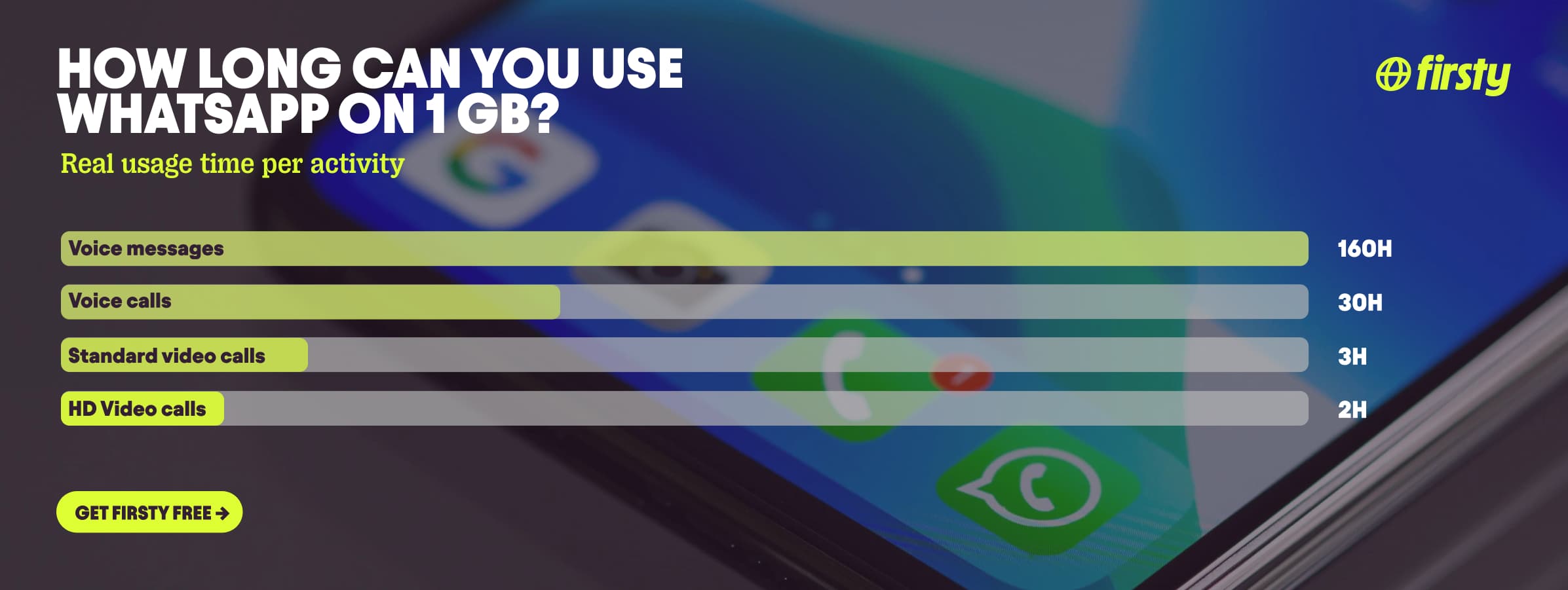
If you are rationing a tight travel plan, 1 GB stretches a long way as long as you stay off the video camera. Here is what a single gigabyte buys you on WhatsApp:
Text messages: over 1,000,000, basically endless
Voice notes: around 160 hours of recorded audio
Voice calls: about 30 hours of talk time
Video calls: about 2 to 3 hours before it runs dry
Video calls are the only thing that eats into a gigabyte quickly. Everything else is hard to exhaust.
How to reduce WhatsApp data usage
Turn on "Use less data for calls." In WhatsApp, go to Settings, then Storage and data, and switch this on. It lowers the data your voice and video calls use.
Stick to voice calls instead of video when you can. A voice call uses roughly ten times less data.
Turn off media auto-download. In Settings, Storage and data, set photos, audio, video, and documents to download over Wi-Fi only, so your data is not spent on every group chat.
Keep your media upload quality on Standard. In Settings, Storage and data, Media upload quality, check that it is set to Standard rather than HD. HD photos and videos can be up to six times larger, so if you ever switched this on, turn it back before you travel.
Go easy on Status updates and Channels. These are photo and video feeds, so scrolling them on mobile data downloads media the same way Instagram does. Save them for Wi-Fi.
Use Wi-Fi for video calls and large files whenever it is available.
Turn on your phone's data saver. On Android it is Data Saver, on iPhone it is Low Data Mode.
Then keep an eye on your totals. Here is how to check.
How to check WhatsApp data usage on iPhone and Android
Inside WhatsApp, go to Settings, then Storage and data, then Network usage. You will see exactly how much data WhatsApp has used for messages, calls, and media since the last reset.
To see it at the phone level:
For iPhone: Open Settings, tap Mobile Data, and scroll to find WhatsApp in the list of apps with their data totals.
For Android: Open Settings, tap Network and internet or Connections, then Data usage, then Mobile data usage, and find WhatsApp in the list.
Frequently asked questions
Does WhatsApp use a lot of data?
For most things, no. Messaging and voice calls use very little, often just a few megabytes per hour. The one exception is video calls, which can use around 300 MB per hour, or up to about 480 MB in HD. Texting, voice notes, and photos stay light.
How much data does a WhatsApp video call use per hour?
A standard WhatsApp video call uses about 300 MB per hour, which works out to roughly 5 MB per minute. On a strong network in HD it can reach about 480 MB per hour. So a 30-minute video call typically costs around 150 MB.
How much data does a WhatsApp voice call use per minute?
A WhatsApp voice call uses about 0.3 to 0.5 MB per minute, or roughly 18 to 30 MB per hour. That makes it one of the most data-efficient ways to talk, far lighter than a video call. On 1 GB you could talk for around 30 hours.
How much data does a WhatsApp message use?
A text message uses under 1 KB, so even sending hundreds a day barely registers on your data plan. Data only adds up when you send media like photos, which run 100 to 500 KB each, or videos at 2 to 10 MB.
Does WhatsApp use data or Wi-Fi?
WhatsApp uses whichever connection your phone is on. On Wi-Fi it uses no mobile data at all. On mobile data, every message, call, and media file counts against your plan, which is why roaming abroad can get expensive.
How much data does WhatsApp use per month?
It depends entirely on how you use it. A typical user who mostly texts and makes the occasional voice call might use well under 1 GB a month. Frequent video calls are what push it higher, since each hour can cost up to 480 MB.
Can you use WhatsApp for free abroad?
Yes. Firsty Free gives you mobile data in 185+ countries by watching a short ad, with no contract or payment, so you can keep messaging and calling on WhatsApp while you travel. If you want uncapped data for long video calls, Firsty Unlimited is €2 to €3 per day.


