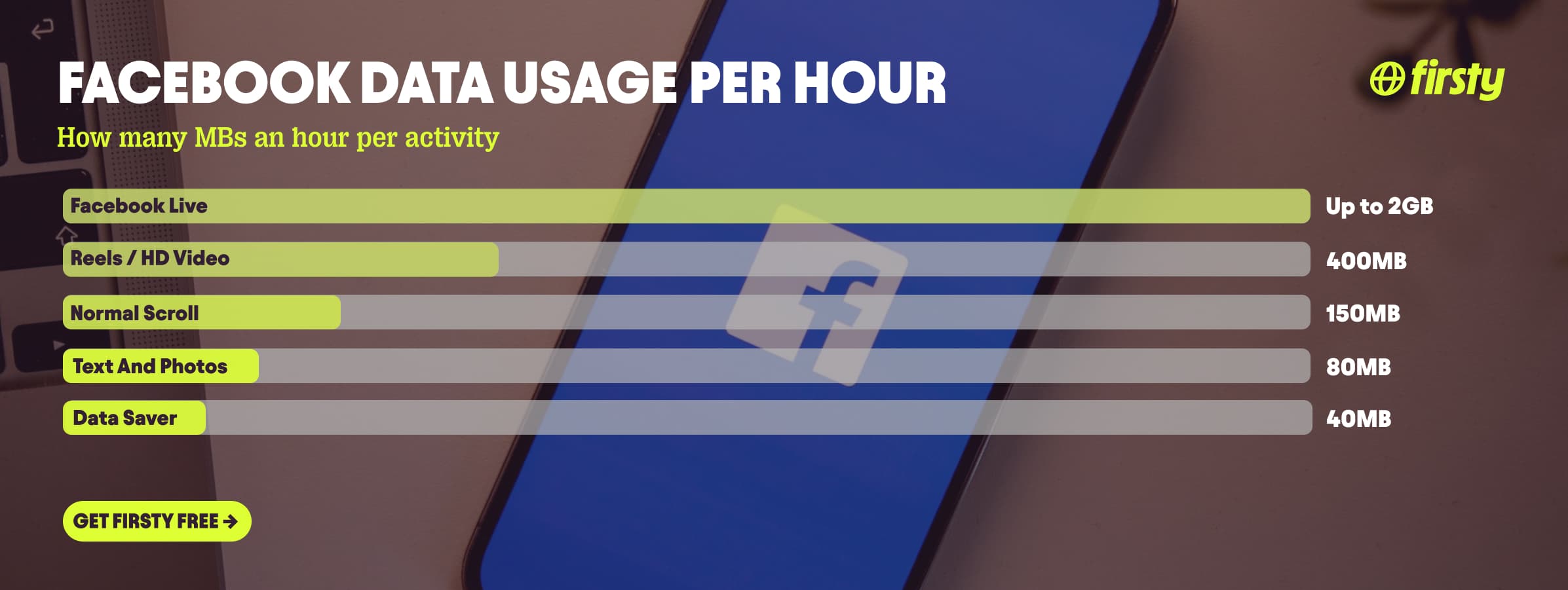
Facebook uses about 80 MB per hour if you stick to text posts and photos, around 150 MB per hour for normal feed scrolling with video autoplay on, and 400 MB to over 1 GB per hour once you start watching Reels, HD video, or Facebook Live. The single biggest factor is autoplay video, which is switched on by default over mobile data. A typical 30-minute scroll burns roughly 75 to 200 MB depending on how many videos load. That means 1 GB of data lasts about 6 hours of normal scrolling, but only around 2.5 hours if you watch a lot of Reels. Facebook sits in the middle of the data-hungry app pack: heavier than music streaming or messaging, lighter than full-screen video like YouTube, but it climbs fast the moment your feed fills with video.
If you mostly want to scroll Facebook abroad without watching your data tick down, there's a shortcut. Firsty Free gives you mobile data in 171 countries just for watching a short ad, so a travel scroll session does not have to cost you anything.
Below is the full breakdown by activity, how long 1 GB really lasts, why Facebook eats so much in the first place, and the settings that cut it down fast.
In this article:
How much data does Facebook use per hour?
Facebook uses roughly 80 MB per hour for text and photos, about 150 MB per hour for normal scrolling with autoplay on, and 400 MB to 1 GB or more per hour for video, Reels, and Live.
What you're doing | Data per hour |
|---|---|
Text posts and photos, autoplay off | ~80 MB |
Normal feed scrolling, autoplay on | ~150 MB |
Watching Reels or HD video (1080p) | ~400 to 600 MB |
Watching video in 4K | ~1.2 GB |
Facebook Live | 500 MB to 2 GB |
Data Saver mode or Facebook Lite | ~40 MB |
Video quality is what moves the needle. The same hour of Facebook video costs about 18 MB at 240p, 120 MB at 480p, 300 MB at 720p, and 420 MB at 1080p. Photos are cheap at roughly 100 to 300 KB each, and a single Story runs about 0.5 to 2 MB.
How long does 1 GB of data last on Facebook?
1 GB of data lasts about 6 hours of normal Facebook scrolling, around 12 hours if you keep to text and photos, and roughly 2.5 hours if you watch Reels or HD video.
What you're doing | How long 1 GB lasts |
|---|---|
Text and photos, autoplay off | ~12 hours |
Normal feed, autoplay on | ~6 hours |
Reels or HD video | ~2.5 hours |
Facebook Live (HD) | ~1 hour |
Data Saver or Facebook Lite | ~24 hours |
So a single gigabyte is plenty for a week of casual checking, but an hour of Facebook Live can wipe most of it in one sitting.
Why does Facebook use so much data?
Facebook uses so much data mainly because video autoplays by default over mobile data, and the app preloads videos and photos in your feed before you even reach them.
Three things drive it. Autoplay video is set to play on mobile data and Wi-Fi out of the box, so clips start the moment they scroll into view. The feed also preloads upcoming videos and high-resolution photos so they play instantly, which means you download content you may never watch. And Facebook keeps using small amounts of data in the background, refreshing notifications and content when the app is closed. In rare cases that background activity runs away with itself, and some travelers have reported Facebook chewing through tens of gigabytes in a day, almost always tied to autoplay and preloading left on full. One newer quirk to know about: songs attached to photo posts can start playing even with video autoplay switched off, because Facebook treats those posts as images rather than videos.
One thing travelers forget: uploading drains data faster than scrolling past content does. Posting a one-minute HD video can use 100 MB or more, and a batch of 20 high-resolution holiday photos can run 40 to 100 MB, because your phone sends the full file each time. If you post a lot on the road, turn off Upload HD photos and videos in the Media settings.
Use Facebook abroad without burning your data plan
If you are traveling or worried about your monthly data cap, there is a simpler answer than counting megabytes.
Firsty Free gives you mobile data in 171 countries by watching short ads. Genuinely free, no payment required, no contract, no credit check.
Firsty Prepaid starts at €0.98/GB. Buy data once, use it whenever. GBs never expire.
Firsty Unlimited is €2 to €3 per day or €49 per month for genuinely uncapped data.
Most travel data plans charge you €10 to €15 per day in roaming. Your home carrier charges similar. Firsty is the alternative.
Already have Firsty? Open the app, install the eSIM, and you are connected, no number changes, no SIM swap.
How does Facebook compare to other apps?
Facebook sits in the middle of the pack. Heavier than music streaming, navigation, and plain messaging, lighter than full-screen video like YouTube and Netflix, but it closes that gap fast once your feed fills with Reels and autoplay video.
App | Data per hour (heavy use) | Data per hour (light use) |
|---|---|---|
~400 MB (Reels, HD video) | ~80 MB (text and photos) | |
Snapchat | ~360 MB (Stories, Spotlight) | ~20 MB (chat only) |
TikTok | ~840 MB | ~280 MB |
Netflix | 3 GB (1080p HD) | 300 MB (Save Data mode) |
YouTube | 1.5 GB (720p) | 90 MB (144p) |
Zoom / Teams | ~1.1 GB (1-on-1 HD video) | ~50 MB (audio only) |
~720 MB (scrolling) | n/a | |
480 MB (video call) | n/a | |
FaceTime | ~250 MB (video call) | ~30 MB (audio call) |
Spotify | 150 MB (Very High audio) | 40 MB (Normal audio) |
Google Maps | ~20 MB (satellite view) | ~5 MB (navigation) |
Want the full picture for the other apps eating your data? Check the breakdowns for Snapchat, TikTok, Netflix, YouTube, Zoom and Teams, Instagram, WhatsApp, FaceTime, and Spotify. Facebook stays lighter than the video-first apps for everyday scrolling, but Facebook Live session pushes it right up into TikTok and Instagram territory.
How to reduce Facebook data usage
The fastest way to cut Facebook data is to turn off video autoplay and switch on Data Saver, which together can drop your usage by more than half.
Turn off autoplay. Open Settings and Privacy, then Settings, then Media, and set Autoplay to Never Autoplay Videos. This stops clips loading as you scroll, the single biggest saving you can make.
Switch on Data Saver. In that same Media menu, under Video Quality, tap Data Saver. Videos you do choose to watch then play at lower resolution.
Turn off HD uploads. Still in Media settings, switch off Upload HD photos and Upload HD videos so posting from your trip sends smaller files.
Open links in your own browser. Facebook's in-app browser loads every tracker and ad on a page and logs it all under the Facebook app, with none of your browser's data savings. When you tap a link, use the three-dot menu and choose Open in external browser.
Use Facebook Lite if you're on Android. It uses roughly a tenth of the data of the main app and runs fine on weak signal. It is not available on iPhone.
Restrict background data. On iPhone, turn off Background App Refresh for Facebook. On Android, open the app's settings and limit its background data.
Save video and uploads for Wi-Fi. Watch Reels and Live and post your photos when you're connected, and keep mobile data for text and light scrolling.
How to check Facebook data usage on iPhone and Android
You can see exactly how much data Facebook has used in your phone settings, not inside the app.
On iPhone: open Settings, tap Cellular or Mobile Data, scroll down to the app list, and find Facebook. The figure under it is the data the app has used in the current period.
On Android: open Settings, go to Network and internet, then Mobile network, then App data usage, and tap Facebook for a full breakdown including background data.
Reset the counter at the start of a trip if you want to track a single journey.
Frequently asked questions
Does Facebook use a lot of data?
Yes, more than most people expect. Normal scrolling with autoplay on runs about 150 MB per hour, and watching Reels or HD video can hit 400 MB to over 1 GB per hour. Sticking to text and photos keeps it light at around 80 MB per hour.
Why is Facebook using so much data in the background?
Facebook refreshes notifications and preloads feed content even when the app is closed, which quietly uses data. Autoplay and preloading left on full are the usual cause of large unexpected spikes. Turning off Background App Refresh and autoplay stops most of it.
How much data does Facebook use per hour?
Roughly 80 MB for text and photos, about 150 MB for normal scrolling with autoplay on, and 400 MB to 1 GB or more for video, Reels, and Live. Video quality is the main lever, with 1080p costing around 420 MB per hour.
How many GB does Facebook use per month?
At about 45 minutes of mixed use a day, Facebook uses roughly 2 to 3 GB per month. Watch a lot of video and that can climb past 5 GB. Text-and-photo browsing keeps it closer to 1 GB.
Is Facebook Lite better for saving data?
Yes, on Android. Facebook Lite uses about a tenth of the data of the full app because it strips out heavy video and high-resolution images. It is a good choice for travel or weak signal, but it is not available on iPhone.
Does Facebook Reels use more data than the normal feed?
Yes. Reels are short autoplay HD videos, so they behave like TikTok and can use 400 MB to 800 MB per hour, well above the 80 to 150 MB of normal feed scrolling.
Does this include Facebook Messenger?
No. These figures are for the main Facebook app. Messenger is a separate app: text barely uses data, voice calls are light at around 20 MB per hour, and video calls are heavier at roughly 5 to 15 MB per minute.