
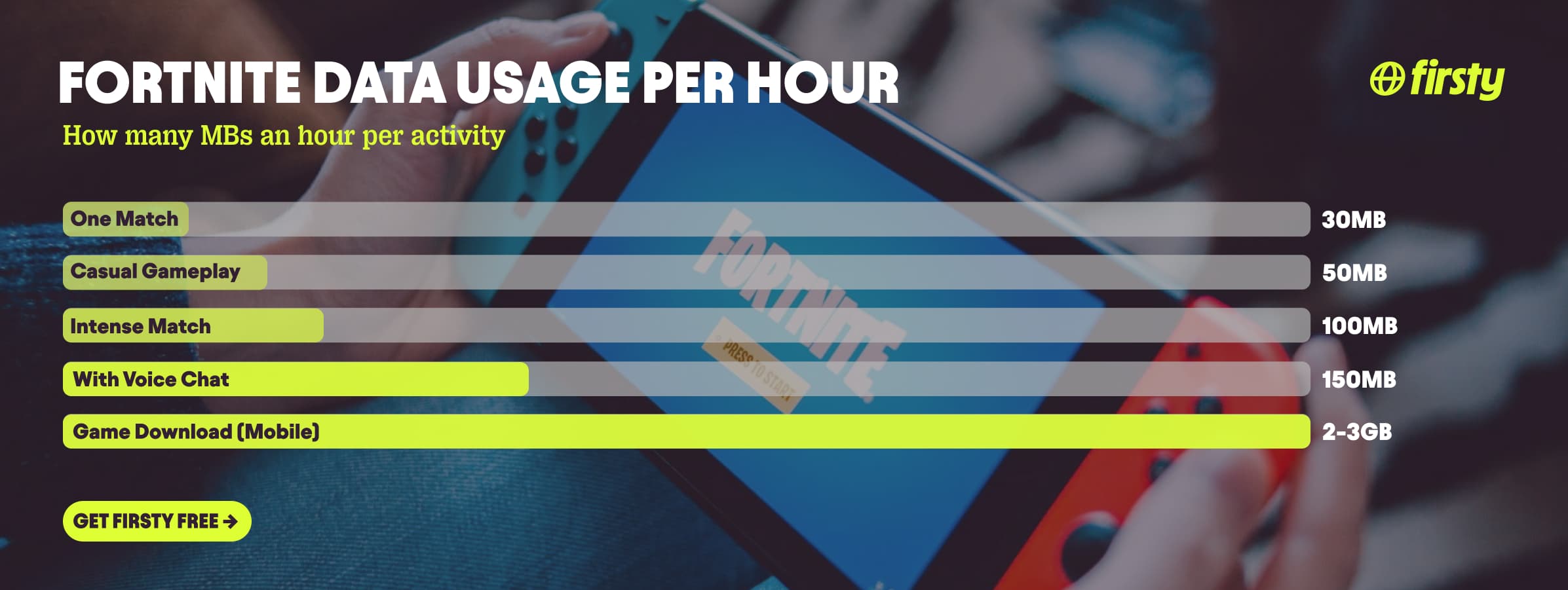
Fortnite uses about 50 to 100 MB of data per hour of gameplay, which is light, lighter than streaming music on high quality. A typical 15 to 25 minute match runs roughly 15 to 40 MB, and voice or party chat adds another 40 to 60 MB per hour. So playing is cheap. The expensive parts are downloads and cloud streaming. The game is 2 to 3 GB to install on mobile and 30 GB or more on PC and console, and a single season update can run up to 25 GB. Playing through a cloud service like Xbox Cloud Gaming is the real trap: that streams video at 3 to 10 GB per hour. That is why people say Fortnite ate their data, it was almost never the matches. One gigabyte gives you 10 to 20 hours of native play, but not enough to install the game even once.
The download is the real risk when you are traveling, and one forced update on roaming can cost more than a week of matches. Firsty gives you mobile data in 185+ countries by watching a short ad, so you can pull an update or reinstall without nuking your plan.
Below is the full breakdown: data per hour, per match, what the download actually costs on each platform, the cloud gaming trap, how far 1 GB goes, and how to keep your usage down.
On this page
How much data does Fortnite use per hour?
Fortnite uses about 50 to 100 MB of data per hour of gameplay. Casual play with no voice chat sits near the bottom of that range, around 50 MB. Longer, more intense sessions push toward 100 MB. The reason it stays low is that Fortnite does not stream video: it sends small packets of player positions, actions, and hits, not a high-bitrate picture. Voice and party chat are the biggest gameplay variable, adding roughly 40 to 60 MB per hour on top. Note that the mobile build is compressed and runs a little lighter than PC or console, often around 40 MB per hour less for the same play.
| What you are doing | Data used |
|---|---|
| Casual gameplay, no voice (native app) | ~50 MB per hour |
| Intense match or longer session | ~100 MB per hour |
| Voice or party chat | +40 to 60 MB per hour |
| Cloud gaming (Xbox Cloud, GeForce Now) | ~3 to 10 GB per hour |
| One match, 15 to 25 minutes | ~15 to 40 MB |
| Installing on mobile | 2 to 3 GB download, 10 to 14 GB installed |
| Installing on PC | 30 to 50 GB, up to 90 GB or more with HD textures |
| Installing on console | 30 to 70 GB, current-gen at the top |
| Installing on Nintendo Switch | 15 to 20 GB, about 38 GB on Switch 2 |
| A season or chapter update | Several GB, up to about 25 GB |
How long does 1 GB of data last on Fortnite?
One gigabyte gives you roughly 10 to 20 hours of native Fortnite gameplay, depending on how hard you play and whether voice chat is on. Here is the real breakdown.
| How you play | Time on 1 GB |
|---|---|
| Casual gameplay, no voice (~50 MB/hr) | About 20 hours |
| Intense play (~100 MB/hr) | About 10 hours |
| Playing with voice chat (~150 MB/hr) | About 7 hours |
| Full matches | About 30 to 60 matches |
| Cloud gaming (Xbox Cloud, GeForce Now) | About 10 to 20 minutes |
| Installing the game | Not even once |
That contrast is the point. One gigabyte covers a long week of native matches but does not come close to installing Fortnite or downloading a single season update. Cloud gaming flips it entirely: 1 GB is gone in roughly 10 to 20 minutes, because you are streaming video rather than playing locally.
Why does Fortnite use so much data?
Fortnite does not use much data to play. It uses a lot to download. The matches are tiny, but the game itself is huge: 2 to 3 GB to install on mobile (about 10 to 14 GB once installed on Android), 30 to 50 GB on PC and over 90 GB with high-resolution textures and extra modes, 30 to 70 GB on console with current-gen PS5 and Xbox Series X and S at the top, and 15 to 20 GB on Nintendo Switch. Then every new season or chapter brings an update that can run several gigabytes, with chapter launches reaching about 25 GB. If your data vanished after a Fortnite session, it was almost certainly an update downloading in the background, not the game you played. This is the one to watch when traveling, because a forced update over roaming can cost more than a month of actual matches.
Does Fortnite use more data on cloud gaming?
Yes, far more. Playing Fortnite through a cloud service like Xbox Cloud Gaming, GeForce Now, or Amazon Luna uses about 3 to 10 GB per hour, because the service streams a live video feed of the game to your screen instead of running it on your device. That is 30 to 100 times more than the 50 to 100 MB native play uses, in the same range as streaming Netflix or YouTube in HD. On mobile data or a hotspot, one hour of cloud Fortnite can burn more than a month of normal matches, so keep cloud streaming on wifi.
Play Fortnite abroad without burning your data plan
If you are traveling or worried about your monthly data cap, there is a simpler answer than counting megabytes.
Firsty Free gives you mobile data in 185+ countries by watching short ads. Genuinely free, no payment required, no contract, no credit check.
Firsty Prepaid starts at €0.98/GB, buy data once, use it whenever. GBs never expire.
Firsty Unlimited is €2 to €3 per day or €49 per month for genuinely uncapped data. Download a full season update or reinstall the game on day one without watching your plan evaporate.
Most travel data plans charge you €10 to €15 per day in roaming. Your home carrier charges similar. Firsty is the alternative.
Already have Firsty? Open the app, install the eSIM, and you're connected, no number changes, no SIM swap.
How does Fortnite compare to other apps?
Fortnite gameplay is one of the lightest things on this list. The per-hour cost sits down near music streaming and navigation, far below video apps like YouTube and Netflix. The twist is that the real data cost is not playing, it is downloading: the install and each season update dwarf a month of matches.
| App | Data per hour (heavy use) | Data per hour (light use) |
|---|---|---|
| Fortnite | ~100 MB (intense match, voice chat) | ~50 MB (casual gameplay) |
| Snapchat | ~360 MB (Stories, Spotlight) | ~20 MB (chat only) |
| TikTok | ~840 MB | ~280 MB |
| Netflix | 3 GB (1080p HD) | 300 MB (Save Data mode) |
| YouTube | 1.5 GB (720p) | 90 MB (144p) |
| Zoom / Teams | ~1.1 GB (1-on-1 HD video) | ~50 MB (audio only) |
| ~720 MB (scrolling) | n/a | |
| 480 MB (video call) | n/a | |
| FaceTime | ~250 MB (video call) | ~30 MB (audio call) |
| Spotify | 150 MB (Very High audio) | 40 MB (Normal audio) |
| Google Maps | ~20 MB (satellite view) | ~5 MB (navigation) |
Want the full picture for the other apps eating your data? Check the breakdowns for Roblox, Clash Royale, PokemonGo YouTube, Netflix, TikTok, Instagram, FaceTime, WhatsApp, Snapchat , Spotify , Zoom, and Google Maps. Fortnite stays lighter than all of them while you actually play natively, but one season update downloads more data than weeks of any of them, and one hour of cloud gaming outruns most of them too.
How to reduce Fortnite data usage
Do every download and update on wifi. This is by far the biggest one. The install and each season update are worth weeks of gameplay, so never let them run on mobile data.
Turn off auto-updates on mobile data, and in the Epic Games Store or launcher, so a patch cannot download in the background while you are on a cellular connection.
If you play through a cloud service like Xbox Cloud Gaming or GeForce Now, treat it like streaming video and stay on wifi. It uses 3 to 10 GB per hour, far more than playing natively.
Mute voice and party chat when you are on mobile data. That alone saves 40 to 60 MB per hour.
Skip the high-resolution texture pack on PC if you are tethering or capped. It is optional and adds tens of gigabytes.
Lower the in-game resolution and frame rate on mobile. The savings are small but they help, and they save battery too.
Close background apps and pause cloud backups while you play on a hotspot, so they are not quietly eating your allowance alongside the game.
How to check Fortnite data usage on iPhone and Android
You can see exactly how much data Fortnite has used in your phone settings.
On iPhone, open Settings, tap Cellular or Mobile Data, scroll to the app list, and find Fortnite or the Epic Games Store entry, since in the EU Fortnite installs through the Epic Games Store rather than the App Store.
On Android, open Settings, go to Network and internet, then Mobile network or SIMs, then App data usage, and select Fortnite. Reset the statistics at the start of each billing cycle so the numbers reflect the current month.
Frequently asked questions
Does Fortnite use a lot of data?
No, not to play. Fortnite uses about 50 to 100 MB per hour, which is light for a game and lower than streaming music. What uses a lot of data is downloading the game and its updates, which run from a couple of gigabytes on mobile to tens of gigabytes on PC, and playing through a cloud service, which streams video.
How much data does Fortnite use on PS4, PS5, PC, and Switch?
Gameplay is similar across platforms, around 50 to 100 MB per hour, with PC and console running slightly heavier than mobile. The downloads differ a lot: about 20 to 40 GB on PS4 and Xbox One, 45 to 70 GB on PS5 and Xbox Series X and S, 30 to 50 GB on PC and past 90 GB with high-resolution textures, and 15 to 20 GB on Nintendo Switch.
Does Fortnite use a lot of data on Xbox Cloud Gaming?
Yes. Cloud services like Xbox Cloud Gaming and GeForce Now stream the game as video, so they use about 3 to 10 GB per hour, compared to 50 to 100 MB playing natively. One hour on a hotspot can cost more than a month of regular matches, so keep cloud gaming on wifi.
Why did Fortnite use all my data?
It was almost certainly an update, not the matches. A single season or chapter update can be several gigabytes, sometimes around 25 GB, and it can download in the background. Set updates to wifi only so this does not happen on mobile data.
Can you play Fortnite on mobile data?
Yes. Native gameplay only needs 50 to 100 MB per hour, so a few matches on mobile data are fine. Keep downloads, updates, and cloud gaming on wifi, because each of those uses gigabytes, far more than the matches themselves.
How many hours will 1 GB of data last on Fortnite?
About 10 to 20 hours of native gameplay. At casual usage near 50 MB per hour, 1 GB lasts around 20 hours, and at intense usage near 100 MB per hour it lasts about 10. With voice chat running, expect closer to 7 hours. On cloud gaming, 1 GB lasts only 10 to 20 minutes.
Is 50 GB of data enough for online gaming?
For Fortnite gameplay, easily. At 100 MB per hour, 50 GB covers around 500 hours of native play. The thing that eats into it is downloads, updates, and cloud streaming, so if you reinstall the game, grab a few big season patches, or play through the cloud over mobile data, that allowance shrinks fast.


