
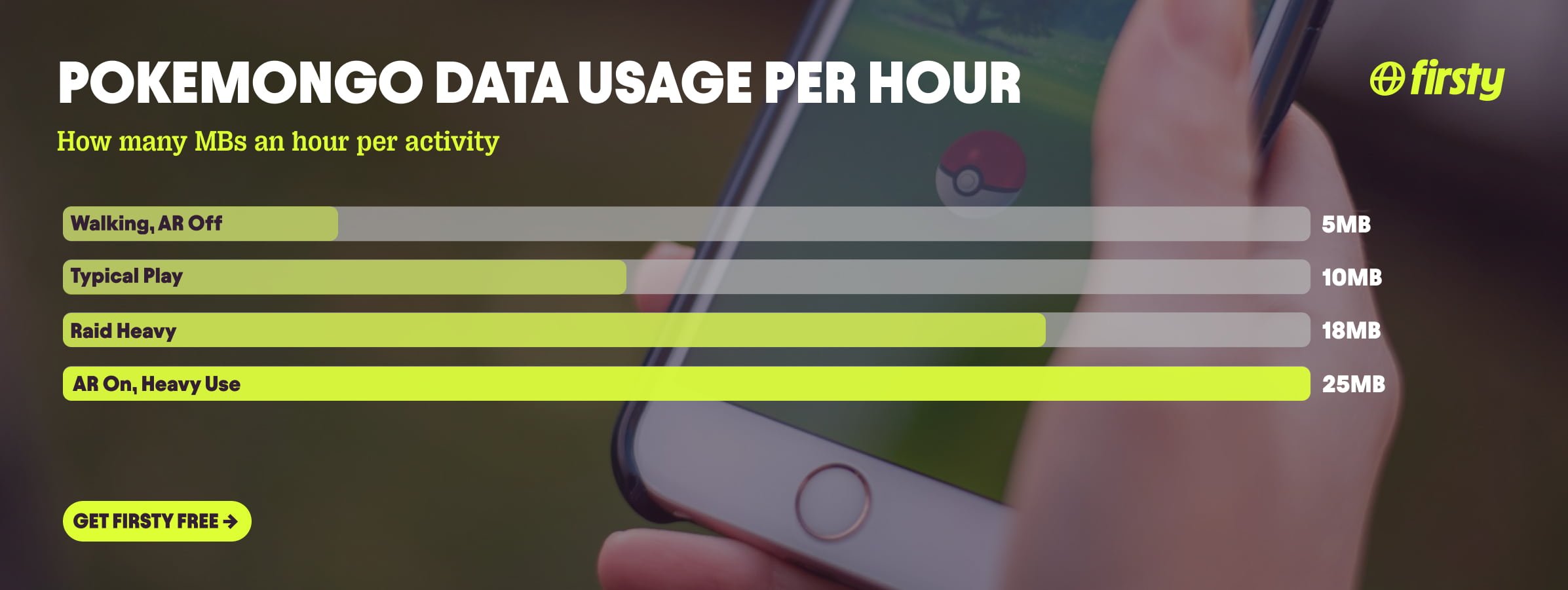
Pokémon GO uses about 5 to 25 MB of data per hour, depending on how you play. Light play (walking, spinning PokéStops, hatching eggs with AR mode off) sits near 5 MB an hour. Typical play lands around 10 MB an hour. Heavy sessions with AR mode on and back to back raids climb to about 25 MB an hour. That makes Pokémon GO one of the lightest data apps on your phone, lighter than Google Maps navigation and nowhere near video apps. At a typical 10 MB an hour, 1 GB of data lasts roughly 100 hours of play. Even a hardcore player rarely clears 1 to 2 GB in a month. The bigger drain is your battery, not your data. The one real catch: the game needs a live internet connection the whole time you play, so the cost shows up when you play abroad on roaming.
If you play while traveling, the data is cheap but the connection is the problem. Firsty gives you mobile data in 185+ countries, so you can keep catching Pokémon abroad without paying roaming rates to your home carrier.
Here is the full breakdown by activity, how long 1 GB really lasts, why the number stays so low, and how to keep it lower.
On this page:
How much data does Pokémon GO use per hour?
Pokémon GO uses about 5 to 25 MB per hour, with most players landing near 10 MB per hour. There is no quality setting to change, so your usage depends almost entirely on how active you are and whether AR mode is on.
| How you play | Data per hour |
|---|---|
| Walking and spinning PokéStops, AR off | ~5 MB |
| Typical play, catching and a mix of activities | ~10 MB |
| Lots of raids and gym battles | ~15 to 20 MB |
| AR mode on, downloading assets over mobile data | ~25 MB |
Newer multiplayer and live features lean toward the higher end of that range. Actively tracking a Route, joining Party Play, or syncing PokéStop Showcases all add continuous server updates, so expect to sit nearer the raid heavy band than plain walking.
These are independent measurement figures, not numbers from Niantic, which does not publish an official per-hour rate. Treat them as estimates and expect some swing by phone, region, and connection.
Does Pokémon GO use a lot of data?
No. Pokémon GO does not use a lot of data. At roughly 5 to 25 MB per hour it is one of the most data-efficient apps you can run, using a fraction of what streaming video, social feeds, or video calls burn. A single hour of Netflix in HD uses more data than a full week of daily Pokémon GO. The number that actually catches people out is battery, not data.
How long does 1 GB of data last on Pokémon GO?
At typical use of about 10 MB per hour, 1 GB of data lasts roughly 100 hours of Pokémon GO. Play lightly and it stretches past 200 hours. Play heavy with AR on and it is closer to 40 hours.
| How you play | Hours of play on 1 GB |
|---|---|
| Light, walking with AR off, ~5 MB/hr | ~200 hours |
| Typical, ~10 MB/hr | ~100 hours |
| Raid heavy, ~15 to 20 MB/hr | ~50 to 65 hours |
| AR on and heavy, ~25 MB/hr | ~40 hours |
For a one week trip playing an hour or two a day, you will use well under 200 MB. Even two weeks of daily play rarely tops 500 MB, so 1 GB covers most travel.
Why does Pokémon GO use so little data?
Pokémon GO uses so little data because it streams almost no media. It mostly sends tiny location pings and small game state updates, not video or high resolution images. The map tiles and Pokémon models are lightweight and cached on your phone, and GPS itself uses no data at all. The heavy lifting happens on your hardware, the GPS, screen, and camera, which is why the game eats battery fast while barely touching your data. The exceptions are AR mode, which adds camera processing and raises data use noticeably, and the occasional asset or map update the game pulls when it loads a new area.
Can you play Pokémon GO without data?
No, you cannot really play Pokémon GO without data. The game needs a live connection to load spawns, raids, gyms, and to save your progress. Your phone's GPS works offline, so it can still track your movement, but the game itself goes nowhere without a connection. This is exactly why a working data connection abroad matters more for Pokémon GO than the size of your data plan.
Play Pokémon GO abroad without burning your data plan
If you are traveling or worried about your monthly data cap, there is a simpler answer than counting megabytes.
Firsty Free gives you mobile data in 185+ countries by watching short ads. Genuinely free, no payment required, no contract, no credit check.
Firsty Prepaid starts at €0.98/GB, buy data once, use it whenever. GBs never expire.
Firsty Unlimited is €2 to €3 per day or €49 per month for genuinely uncapped data. Stay connected for raids, gym battles, and Adventure Sync all day without watching a counter.
Most travel data plans charge you €10 to €15 per day in roaming. Your home carrier charges similar. Firsty is the alternative.
Already have Firsty? Open the app, install the eSIM, and you are connected, no number changes, no SIM swap.
How does Pokémon GO compare to other apps?
Pokémon GO sits at the very bottom of the data scale. It uses less per hour than almost any app you will open, lighter than Google Maps navigation and a tiny fraction of what video apps burn. The catch is not the volume, it is that the game runs on a live connection the entire time you are out walking.
| App | Data per hour (heavy use) | Data per hour (light use) |
|---|---|---|
| Pokémon GO | ~25 MB (AR on, raids) | ~5 MB (walking, AR off) |
| Snapchat | ~360 MB (Stories, Spotlight) | ~20 MB (chat only) |
| TikTok | ~840 MB | ~280 MB |
| Netflix | 3 GB (1080p HD) | 300 MB (Save Data mode) |
| YouTube | 1.5 GB (720p) | 90 MB (144p) |
| Zoom / Teams | ~1.1 GB (1-on-1 HD video) | ~50 MB (audio only) |
| ~720 MB (scrolling) | n/a | |
| 480 MB (video call) | n/a | |
| FaceTime | ~250 MB (video call) | ~30 MB (audio call) |
| Spotify | 150 MB (Very High audio) | 40 MB (Normal audio) |
| Google Maps | ~20 MB (satellite view) | ~5 MB (navigation) |
Want the full picture for the other apps eating your data? Check the breakdowns for Roblox, Clash Royale, YouTube, Netflix, TikTok, Instagram, FaceTime, WhatsApp, Snapchat , Spotify , Zoom, and Google Maps. Pokémon GO stays the lightest of the bunch for everyday play, but there is a twist: the others mostly run on Wi-Fi at home, while Pokémon GO runs on mobile data the whole time you are outside, which is why a connection abroad matters far more than the megabytes do.
How to reduce Pokémon GO data usage
Usage is already low, but if you want to keep it minimal, especially on a limited plan:
Turn off AR mode. It adds the most data and drains battery, and your catch rate is identical with it off.
Use the in-game Download All Assets feature, found under Settings then Advanced Settings, while you are on Wi-Fi. It pulls all the game's 3D models and audio at once, a few hundred MB, so your phone is not streaming them over mobile data while you are out playing.
Turn on Low Data Mode on iPhone or Data Saver on Android at the system level.
Close background apps so other apps and syncing are not sipping data while you play.
Do remote raids on Wi-Fi when you can, since those pull more than walking around does.
How to check Pokémon GO data usage on iPhone and Android
You can see exactly how much Pokémon GO has used in your phone settings, no extra app needed.
On iPhone: open Settings, tap Cellular or Mobile Data, and scroll down to the app list to find Pokémon GO. The figure is data used since your last reset. At the bottom of that menu you can see the Last Reset date and tap Reset Statistics to start a fresh count.
On Android: open Settings, then Network and internet (some phones call it Connections), then Mobile network or SIMs, then App data usage, and find Pokémon GO. Paths vary by brand: Samsung often files it under Connections, Pixel under Network and internet, and on some phones it is Settings, then Apps, then Pokémon GO, then Mobile data.
Reset the cellular statistics at the start of a billing cycle or trip to get a clean read of how much the game actually uses.
Frequently asked questions
Is Pokémon GO heavy on data?
No. Pokémon GO uses about 5 to 25 MB per hour, which is among the lightest of any app. 1 GB covers around 100 hours of typical play. For comparison, one hour of HD Netflix uses more data than a week of daily Pokémon GO.
How many GB of data do I need for Pokémon GO for a week?
Almost none. Playing an hour or two a day for a week uses well under 200 MB. Even two weeks of daily play rarely tops 500 MB, so 1 GB is more than enough for most trips.
Can you play Pokémon GO without data or Wi-Fi?
No. The game needs a live connection to load spawns, raids, gyms, and to save progress. GPS works offline so your movement still tracks, but the game itself does not run without data.
Does Pokémon GO use more battery or data?
Battery, by far. The GPS, screen, and AR camera drain your battery quickly, while data use stays tiny at a few megabytes per hour. If you are out playing for hours, bring a power bank, not a bigger data plan.
Why does Pokémon GO say my account failed to authenticate?
That error usually means the game cannot reach Niantic's servers, which is often a mobile data or eSIM connection issue rather than a bug in Pokémon GO. Check that mobile data is switched on for the game and that your eSIM has an active connection. A clean data connection normally clears it.
Does AR mode use more data in Pokémon GO?
Yes, a bit. AR mode adds camera and sensor processing and can raise your data use noticeably. Turning it off saves both data and battery, and it has no effect on whether you catch the Pokémon.
Does Pokémon GO use data in the background?
A little. Adventure Sync and notifications use small amounts of data when the app is closed. It is minor, but you can limit it in your phone's background data settings if you want to keep it to zero between sessions.


