
Google Maps uses about 3 to 5 MB of data per hour for standard turn-by-turn navigation. That is tiny. You could drive for ten hours straight and use less than 50 MB. Turn on live traffic and it climbs to 7 to 10 MB an hour. The real data drains are satellite view, at 15 to 30 MB an hour, and 3D Immersive View, which can hit 10 MB a minute, roughly 600 MB an hour. Downloading an offline map of a city is a one-time hit of around 100 MB. For everyday navigation, Google Maps is one of the lightest apps on your phone, lighter than streaming a single song. The numbers only get big when you switch on the high-resolution visual layers or constantly reroute.
If the real worry is your data plan abroad, you can skip the math entirely. Firsty Free gives you mobile data in 185+ countries by watching a short ad, enough to run Google Maps with no roaming charges and no SIM swap.
On this page:
How much data does Google Maps use per hour?
Standard navigation uses 3 to 5 MB per hour. Everything else depends on which features you switch on. Here is the full breakdown by activity:
| Activity | Data per hour |
|---|---|
| Standard navigation (map view) | 3 to 5 MB |
| Navigation with live traffic on | 7 to 10 MB |
| Heavy use (frequent rerouting, zooming, long trips) | 12 to 20 MB |
| Satellite view | 15 to 30 MB |
| 3D Immersive View / Live View | up to 10 MB per minute (around 600 MB/hr) |
| Just opening the app or loading a new area | 1 to 3 MB |
| Downloading an offline map | around 100 MB per area, one time |
The takeaway: regular navigation is almost free in data terms. The only way to make Google Maps expensive is satellite view or the 3D visual layers.
How long does 1 GB last on Google Maps?
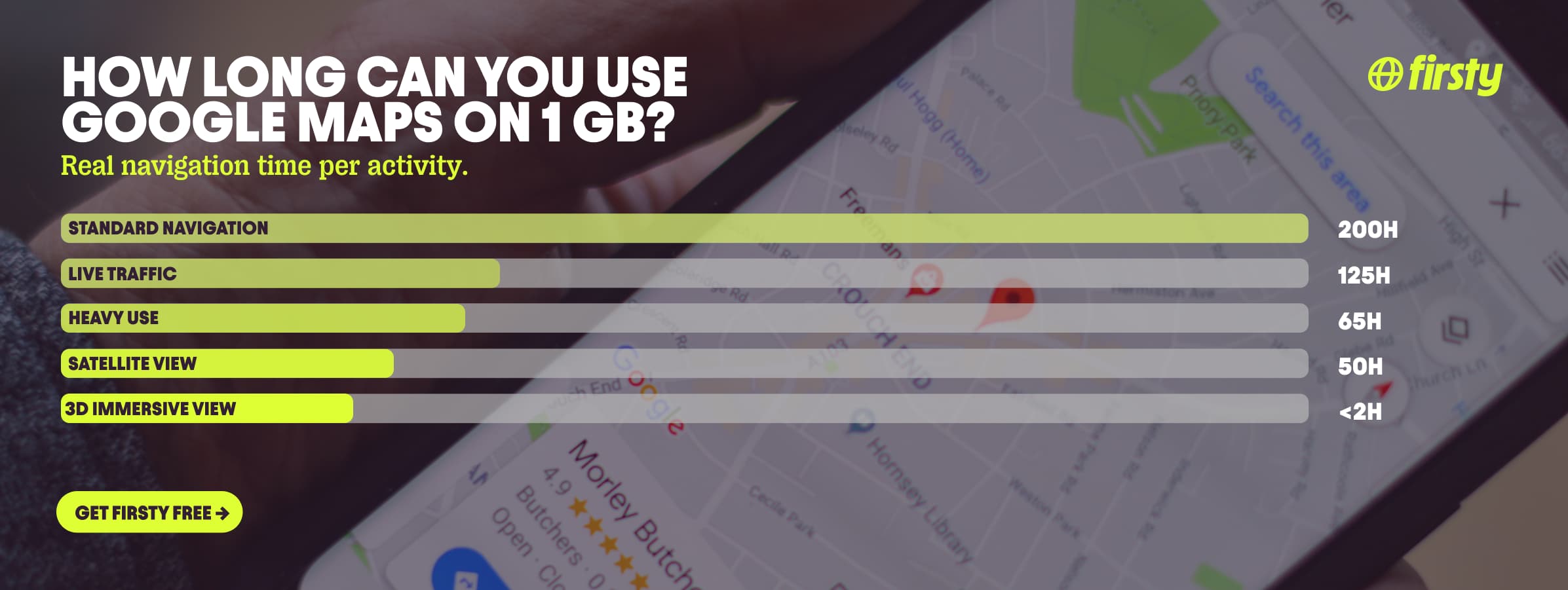
On standard navigation, 1 GB of data lasts roughly 200 hours, enough to navigate every day for months. It only burns fast if you sit in satellite or 3D view. Here is how far 1 GB goes by activity:
| What you are doing | How long 1 GB lasts |
|---|---|
| Standard navigation, 5 MB/hr | around 200 hours |
| Standard navigation, 3 MB/hr | around 330 hours |
| Navigation with live traffic, 8 MB/hr | around 125 hours |
| Heavy use and rerouting, 15 MB/hr | around 65 hours |
| Satellite view, 20 MB/hr | around 50 hours |
| 3D Immersive View, 600 MB/hr | under 2 hours |
| Downloading offline maps, around 100 MB each | around 10 city maps |
Why does Google Maps use so much data?
Most of the time it doesn't. Google Maps uses vector maps, which download lightweight lines and text labels instead of heavy images, so a normal map screen is only a few kilobytes. The data spikes come from a handful of specific things.
Satellite view and 3D Immersive View download actual high-resolution photographs for every part of the screen you move across. Frequent rerouting forces the app to pull fresh map data each time you go off-route.
Live traffic constantly refreshes to redraw the red and green road overlays. Zooming in loads more detailed map tiles, and tapping a place to read reviews and photos downloads those too.
If your usage suddenly jumped, it is almost always satellite view, a long trip with constant rerouting, or traffic updates left running.
Does Google Maps use data without wifi?
Yes, unless you download the area first. Online, Google Maps streams map tiles and directions over your mobile data. Download a map of your destination over wifi beforehand and you get full turn-by-turn driving directions with no data at all. The catch: offline maps give you driving directions, places, and addresses, but not live traffic, transit directions, or alternate routes. For a city you are about to explore, downloading it the night before on hotel wifi is the single biggest data saver there is.
Use Google Maps abroad without burning your data plan
If you are traveling or worried about your monthly data cap, there is a simpler answer than counting megabytes.
Firsty Free gives you mobile data in 185+ countries by watching short ads. Genuinely free, no payment required, no contract, no credit check.
Classic starts at €0.98/GB. Buy data once, use it whenever. GBs never expire.
Unlimited is €2 to €3 per day or €49 per month for genuinely uncapped data. Navigate, reroute, and leave satellite view on all day without watching the meter.
Most travel data plans charge you €10 to €15 per day in roaming. Your home carrier charges similar. Firsty is the alternative.
Already have Firsty? Open the app, install the eSIM, and you are connected, no number changes, no SIM swap.
How does Google Maps compare to other apps?
Google Maps is the lightest app on this list. An hour of standard navigation uses about 5 MB, less than Spotify burns in fifteen minutes and a tiny fraction of what video apps use. The only things that push it up are satellite view and 3D Immersive View.
| App | Data per hour (heavy use) | Data per hour (light use) |
|---|---|---|
| Google Maps | ~20 MB (satellite view) | ~5 MB (navigation) |
| Snapchat | ~360 MB (Stories, Spotlight) | ~20 MB (chat only) |
| TikTok | ~840 MB | ~280 MB |
| Netflix | 3 GB (1080p HD) | 300 MB (Save Data mode) |
| YouTube | 1.5 GB (720p) | 90 MB (144p) |
| Zoom / Teams | ~1.1 GB (1-on-1 HD video) | ~50 MB (audio only) |
| ~720 MB (scrolling) | n/a | |
| 480 MB (video call) | n/a | |
| FaceTime | ~250 MB (video call) | ~30 MB (audio call) |
| Spotify | 150 MB (Very High audio) | 40 MB (Normal audio) |
Want the full picture for the other apps eating your data? Check the breakdowns for Snapchat, TikTok, Netflix, YouTube, Zoom and Teams, Instagram, WhatsApp, FaceTime, and Spotify.
Google Maps stays the lightest of the bunch for everyday navigation, but switch to satellite or 3D Immersive View and it closes the gap fast.
How to reduce Google Maps data usage
If your data is tight, these cut Google Maps usage close to zero:
Download the area offline over wifi. Navigation inside a downloaded map uses almost no mobile data, and this is by far the biggest saver.
Stay in standard map view. Satellite view and 3D Immersive View are the only things that make Google Maps data-heavy, so leave them off when you are watching data.
Search your route before you leave wifi. Loading the map and directions once over wifi means there is less to download on the road.
Set offline maps to update over wifi only. In Settings, Offline maps, turn on the wifi-only update option so they do not refresh on mobile data.
Skip Live View and AR walking directions when data is low. The camera overlay pulls far more than the flat map.
Restrict background data for the app in your phone settings if you are not using live location sharing.
How to check Google Maps data usage on iPhone and Android
Google Maps shows up in your phone's built-in data settings, not inside the app itself. Here is where to look on each.
On iPhone:
Open Settings and tap Cellular (or Mobile Data).
Scroll to the app list and find Google Maps. The number under it is what it has used this period.
Toggle it off to lock Google Maps to wifi only.
On Android:
Open Settings and tap Network and internet (or Connections).
Tap Data usage, then App data usage.
Find Google Maps to see its total, then tap it to restrict background data or set a limit.
FAQ
Does Google Maps use a lot of data?
No. Standard navigation uses about 3 to 5 MB an hour, less than it takes to stream one song on Spotify. It only becomes data-heavy if you switch to satellite view or 3D Immersive View. For comparison, an hour of YouTube can use a hundred times more.
How much data does Google Maps use in 8 hours?
About 24 to 40 MB for eight hours of standard turn-by-turn navigation, at 3 to 5 MB an hour. With live traffic on, expect closer to 56 to 80 MB. A full day of driving with Maps still will not crack 100 MB unless you use satellite view.
Does Google Maps use data on iPhone?
Yes, the same as on Android: roughly 3 to 5 MB an hour for standard navigation. There is no difference in data use between iPhone and Android for the same activity. You can see exactly how much in Settings, Cellular, under the Google Maps app.
Does Google Maps use data while driving?
Yes, but very little. Active driving navigation uses about 5 to 10 MB an hour with live traffic on, going toward map tiles, rerouting, and traffic updates as you move. Download the route offline first and it drops close to zero.
Does Waze or Apple Maps use more data than Google Maps?
Waze uses more, around 20 to 30 MB an hour, because it constantly refreshes live traffic and user-reported alerts. Apple Maps is roughly in the same range as Google Maps for standard navigation. Google Maps is one of the most data-efficient navigation apps you can use.
How much data does Google Maps location sharing use?
Very little. Live location sharing sends small position updates in the background and typically uses a few MB a day, not per hour, which is far lighter than active navigation. If your data is tight, you can still turn it off in the app to be safe.
Can I use Google Maps with an eSIM?
Yes. An eSIM gives Google Maps a normal data connection abroad, no different from your home SIM. With Firsty Free you can run basic navigation in 185+ countries by watching a short ad, with no roaming charges. Install the eSIM in the app and Maps works the moment you land.


