
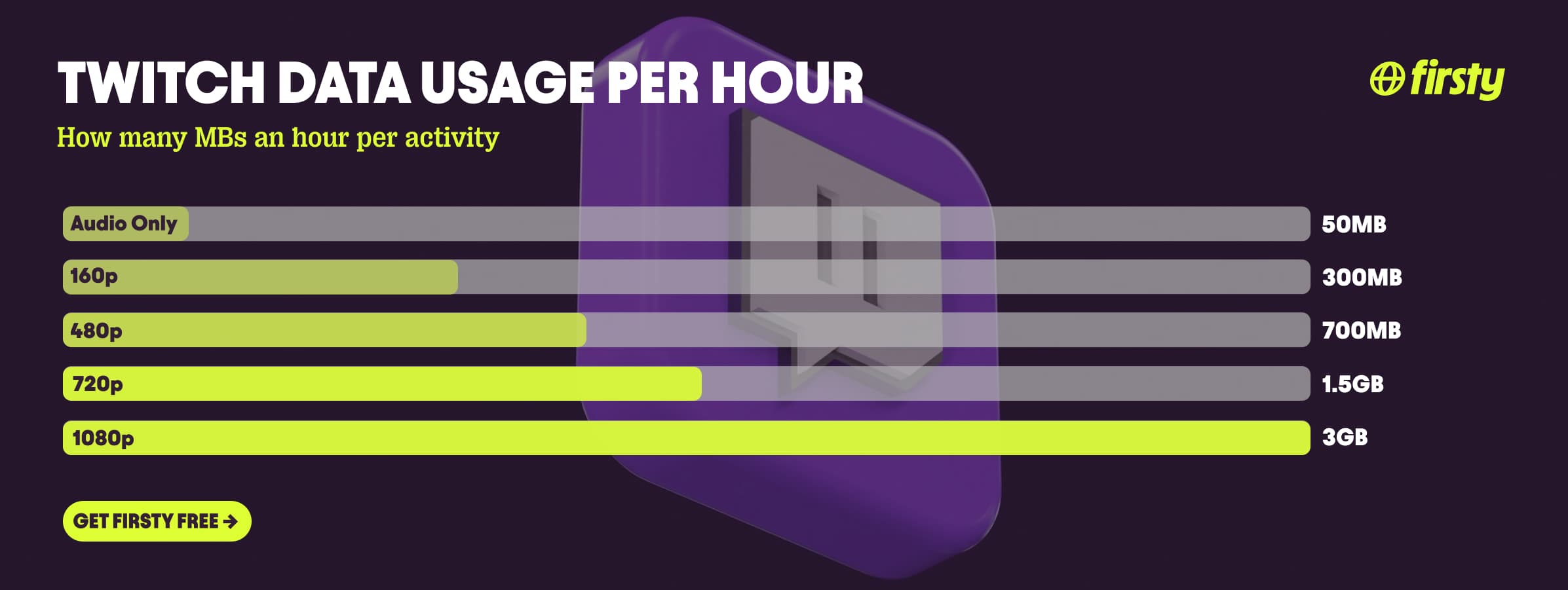
Twitch uses about 3 GB of data per hour at 1080p, around 1.5 GB per hour at 720p, and roughly 700 MB per hour at 480p. Drop to the lowest mobile quality, 160p, and it falls to about 300 MB per hour. Audio-only mode uses far less, roughly 30 to 70 MB per hour. Because Twitch is live video that never stops streaming, it sits at the heavy end of app data use, about as demanding as Netflix in HD. One quirk works in your favor though: Twitch caps most standard streams at 6 Mbps, so it rarely climbs into the 7 GB-plus territory that 4K Netflix or YouTube can reach. The single biggest lever is video quality. Watching at 480p instead of 1080p cuts your data use by more than 75 percent, and on a phone screen you can barely tell the difference.
If you watch Twitch while traveling, that 3 GB per hour is exactly what drains a roaming plan. Firsty Free gives you mobile data in 185+ countries just for watching a short ad, so a few streams abroad cost you nothing.
Below is the full breakdown by quality, how long 1 GB really lasts, why Twitch is so hungry, how it stacks up against other apps, and the settings that cut it down fast.
On this page:
How much data does Twitch use per hour?
Twitch uses about 3 GB per hour at 1080p, around 1.5 GB at 720p, and roughly 700 MB at 480p, dropping to about 300 MB at the lowest 160p setting and 30 to 70 MB in audio-only mode. Quality is the only setting that meaningfully changes your usage, and it changes it a lot.
| Quality | Data per hour |
|---|---|
| 1440p (2K, select channels) | about 4 GB |
| 1080p (Source, up to 60fps) | about 3 GB |
| 720p | about 1.5 GB |
| 480p | about 700 MB |
| 360p | about 450 MB |
| 160p (lowest mobile) | about 300 MB |
| Audio only | about 30 to 70 MB |
These are the figures for watching a stream. The amount does not change much with what is on screen, since Twitch streams at a steady bitrate, so a slow Just Chatting stream and a fast-paced shooter at the same quality use roughly the same data. The 1440p tier only shows up on Twitch Partner and Affiliate channels using Enhanced Broadcasting, and only for logged-in viewers on supported devices. Everywhere else, 1080p is the ceiling.
How long does 1 GB of data last on Twitch?
One GB of data gets you about 20 minutes of Twitch at 1080p, 40 minutes at 720p, nearly an hour and a half at 480p, and over three hours at 160p. In audio-only mode, 1 GB lasts around 20 hours.
| What you watch | How long 1 GB lasts |
|---|---|
| 1440p | about 15 minutes |
| 1080p | about 20 minutes |
| 720p | about 40 minutes |
| 480p | about 1 hour 25 minutes |
| 160p | about 3 hours 20 minutes |
| Audio only | about 20 hours |
So a single GB barely covers a short stream in full quality, but stretches across an entire evening if you drop to 480p or switch off the video.
Why does Twitch use so much data?
Twitch uses a lot of data because it streams live video continuously, with no option to download anything ahead of time, so your phone pulls a fresh feed every second you watch. Unlike Netflix or YouTube, there is nothing cached and nothing to save for later, which is why a long Twitch session quietly outpaces most other apps.
The good news is that Twitch limits most standard streams to 6 Mbps, which keeps even 1080p60 at around 3 GB per hour. One exception is worth knowing: as of mid 2026, Twitch Partners and Affiliates can broadcast in 1440p using Enhanced Broadcasting. If you are logged in, on a supported device, and you select the 1440p option on one of those channels, your data climbs to roughly 4 GB per hour. True 4K is still locked to a small beta, so the 7 to 12 GB-per-hour numbers quoted elsewhere for "4K Twitch" do not apply to normal viewing.
Audio-only mode is the real escape hatch, dropping usage to roughly 30 to 70 MB per hour. One catch: if you only minimize the player instead of switching to audio-only in the app, Twitch can keep pulling the full video stream in the background, so some people find audio-only "still uses data." Select audio-only properly and the saving is real.
Watch Twitch abroad without burning your data plan
If you are traveling or worried about your monthly data cap, there is a simpler answer than counting megabytes.
Firsty Free gives you mobile data in 185+ countries by watching short ads. Genuinely free, no payment required, no contract, no credit check.
Firsty Prepaid starts at €0.98/GB, buy data once, use it whenever. GBs never expire.
Firsty Unlimited is €2 to €3 per day or €49 per month for genuinely uncapped data. Stream Twitch in HD for hours without watching the meter.
Most travel data plans charge you €10 to €15 per day in roaming. Your home carrier charges similar. Firsty is the alternative.
Already have Firsty? Open the app, install the eSIM, and you're connected, no number changes, no SIM swap.
How does Twitch compare to other apps?
Twitch sits at the heavy end. It is about as demanding as Netflix in 1080p and heavier than YouTube at 720p, because it is live video that streams non-stop and cannot be downloaded ahead of time. Its bitrate cap is the saving grace: even the newer 1440p streams top out near 4 GB per hour, well under the 7 GB-plus that 4K Netflix and YouTube can hit.
| App | Data per hour (heavy use) | Data per hour (light use) |
|---|---|---|
| Twitch | ~3 GB (1080p) | ~50 MB (audio only) |
| Snapchat | ~360 MB (Stories, Spotlight) | ~20 MB (chat only) |
| TikTok | ~840 MB | ~280 MB |
| Netflix | 3 GB (1080p HD) | 300 MB (Save Data mode) |
| YouTube | 1.5 GB (720p) | 90 MB (144p) |
| Zoom / Teams | ~1.1 GB (1-on-1 HD video) | ~50 MB (audio only) |
| ~720 MB (scrolling) | n/a | |
| 480 MB (video call) | n/a | |
| FaceTime | ~250 MB (video call) | ~30 MB (audio call) |
| Spotify | 150 MB (Very High audio) | 40 MB (Normal audio) |
| Google Maps | ~20 MB (satellite view) | ~5 MB (navigation) |
Want the full picture for the other apps eating your data? Check the breakdowns for Roblox, Clash Royal, YouTube, Netflix, TikTok, Instagram, FaceTime, WhatsApp, Snapchat , Spotify , Zoom, and Google Maps. Twitch stays lighter than 4K video thanks to its bitrate cap, but a long 1080p session left running closes the gap with the heaviest apps on this list fast.
How to reduce Twitch data usage
Drop the quality. Open the stream, tap the gear icon, and pick 480p or 360p instead of Source or 1080p. That alone cuts your data by more than 75 percent and still looks clear on a phone.
Use audio-only mode for talk streams, music, or Just Chatting. On the mobile app, tap the player, tap the gear icon, and choose Audio Only, which drops data to roughly 30 to 70 MB per hour. It is a mobile-app feature, the Twitch website has no native audio-only.
Turn off autoplay. Twitch loads the next stream and preview clips by default. Disable autoplay in settings so it stops pulling video you are not actually watching.
Watch on wifi when you can. Twitch has no offline mode, so every minute streams live. Save your 1080p viewing for wifi and keep mobile sessions at lower quality.
Set a data warning on your phone. Both iPhone and Android let you cap or get alerted on mobile data, so one long stream cannot quietly blow your whole plan.
Close background apps. Twitch competes for bandwidth with anything syncing in the background, which pushes its usage up, especially on a weak signal.
How to check Twitch data usage on iPhone and Android
On iPhone, go to Settings, then Cellular, scroll down to Twitch, and you will see exactly how much mobile data it has used. Reset the statistics at the start of a trip to track a single journey. On Android, go to Settings, then Network and internet, then Mobile network, then App data usage, and select Twitch to see its total and set a warning or limit.
Frequently asked questions
How much data does a 2 hour Twitch stream use?
A 2 hour Twitch session uses about 6 GB at 1080p, around 3 GB at 720p, and roughly 1.4 GB at 480p. In audio-only mode, 2 hours uses only about 100 to 140 MB. Quality is the deciding factor, so dropping from 1080p to 480p on a long watch saves you several gigabytes.
Does Twitch use more data than YouTube?
At matching quality they are close, but Twitch tends to use more over time because it is always live and cannot be downloaded. Twitch at 1080p runs about 3 GB per hour, similar to Netflix in HD, while YouTube at 720p is closer to 1.5 GB per hour. YouTube also lets you download videos on wifi to watch later, which Twitch does not.
Does Twitch audio only mode use less data?
Yes. Audio-only mode drops Twitch to roughly 30 to 70 MB per hour, compared to about 3 GB per hour at 1080p. It is a mobile-app feature: open a stream, tap the gear icon, and choose Audio Only. Switch to it rather than just lowering the quality, since a minimized video player can keep pulling the full stream.
How much data does streaming on Twitch use?
Broadcasting to Twitch uses about 2.7 GB per hour at 1080p60, because Twitch caps upload bitrate at 6 Mbps. At 720p it drops to around 1.5 GB per hour, and at 480p to about 700 MB per hour. Streaming uploads continuously, so a 3 hour broadcast at 1080p can use 8 GB or more of upload data.
Can you watch Twitch offline to save data?
No. Twitch has no offline download feature, so every live stream and replay uses data while you watch. The only ways to cut usage are lowering the video quality, switching to audio-only mode, or watching on wifi.
How much data does Twitch use at 480p?
Twitch uses about 700 MB per hour at 480p. That is roughly a quarter of what 1080p uses, and 480p still looks clear on a phone, which makes it the best balance of quality and data for mobile viewing.
Is 1 GB enough to watch Twitch?
One GB covers about 20 minutes of Twitch at 1080p, 40 minutes at 720p, or nearly an hour and a half at 480p. For a full evening of streams you will want several gigabytes, or audio-only mode, where 1 GB lasts around 20 hours.


