
Clash Royale uses about 10 to 20 MB of data per hour of active play, with most players landing around 15 MB per hour. A single three to four minute match uses only 150 KB to 1 MB. That makes Clash Royale one of the lightest mobile games you can play on cellular: it sends tiny game-state updates between your phone and Supercell's servers, not video or large media, so it sips data instead of streaming it. At roughly 15 MB per hour, 1 GB of data lasts about 65 to 70 hours of Clash Royale, or well over a thousand matches. The only time the game pulls real data is when you download an app update or a new season, which can be a few hundred MB. Day to day, you can play Clash Royale almost anywhere without touching your data cap.
If you do most of your gaming on the move, the bigger data question is usually everything else on your phone, not Clash Royale. Firsty gives you mobile data in 185+ countries by watching a short ad, so you can keep playing, streaming, and scrolling abroad without paying roaming.
Below is the full breakdown: data per hour, how far 1 GB goes, why the game stays so light, and how it stacks up against the apps that actually eat your data.
On-page contents
Clash Royale data usage per hour
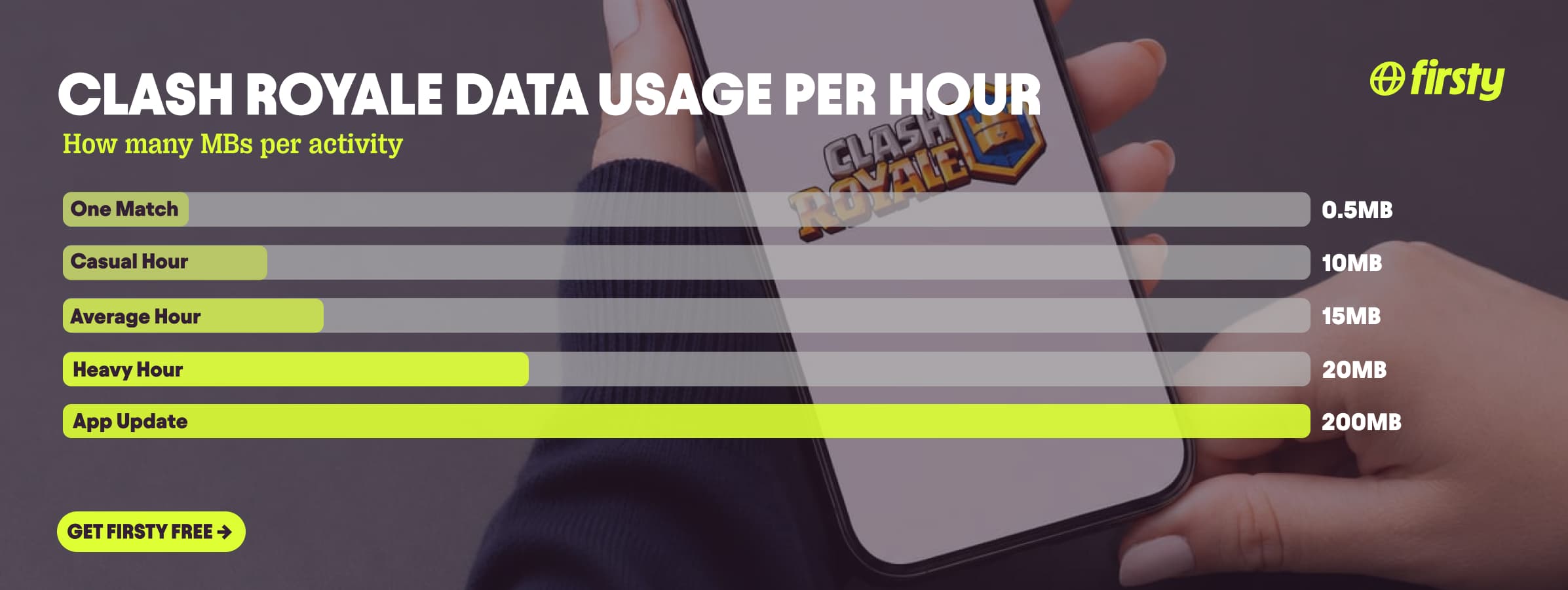
Clash Royale uses about 15 MB per hour on average, from roughly 10 MB during casual play up to 20 MB in heavy sessions like ladder grinding, 2v2, or special events. Here is the breakdown by activity.
| Activity | Data used |
|---|---|
| One match (3 to 4 minutes) | 150 KB to 1 MB |
| One hour of casual play | ~10 MB |
| One hour of heavy play (ladder, 2v2, events) | ~20 MB |
| Average hour | ~15 MB |
| App update or new season | 100 to 300+ MB (one-off) |
The per-hour figure is higher than the per-match figure because it includes everything around the battles too: scrolling the shop, opening chests, chatting in your clan, and watching replays. The actual matches are the cheapest part.
How long does 1 GB of data last on Clash Royale?
1 GB of data gives you about 65 to 70 hours of Clash Royale, based on an average of 15 MB per hour. Play more casually and it stretches further. Here is how far 1 GB goes depending on how you play.
| How you play | How far 1 GB goes |
|---|---|
| Casual play (~10 MB/hour) | ~100 hours |
| Average play (~15 MB/hour) | ~65 to 70 hours |
| Heavy play (~20 MB/hour) | ~50 hours |
| Counted in matches | well over 1,000 matches |
For context, 1 GB gets you only about 5 hours of YouTube at 720p. The same gigabyte covers weeks of Clash Royale.
Why does Clash Royale use so much data?
Most of the time it doesn't. The matches themselves only send small game-state updates, which card you played and where, a few kilobytes at a time, with no video or images. When the game does pull noticeably more, it is almost always one of these, not the battles:
A game update or new season downloading. This is the big one. Supercell ships new arenas, Card Evolutions, and modes like Merge Tactics through client updates that run from 100 to 300+ MB. The first time you open a brand-new event mode, the game may also load its new art, which briefly pushes you above the normal 15 MB per hour.
Browsing the shop and News tab. These screens load images, animated banners, and offers, so scrolling them costs more than a pure battle. It is minor over a session, but it is not free.
Watching video. In-game replays in TV Royale just re-run the game-state code and stay cheap. Tapping out to an external creator stream or esports video plays real video at video data rates, the same as YouTube would.
Background app refresh syncing the game when you are not playing.
Turn off background refresh, do your updates on wifi, and gameplay alone barely moves the needle.
Play Clash Royale abroad without burning your data plan
If you are traveling or worried about your monthly data cap, there is a simpler answer than counting megabytes.
Firsty Free gives you mobile data in 185+ countries by watching short ads. Genuinely free, no payment required, no contract, no credit check.
Firsty Prepaid starts at €0.98/GB, buy data once, use it whenever. GBs never expire.
Firsty Unlimited is €2 to €3 per day or €49 per month for genuinely uncapped data, so you stop thinking about your cap across Clash Royale, streaming, and maps combined.
Most travel data plans charge you €10 to €15 per day in roaming. Your home carrier charges similar. Firsty is the alternative.
Already have Firsty? Open the app, install the eSIM, and you're connected, no number changes and no SIM swap.
How does Clash Royale compare to other apps?
Clash Royale sits right at the bottom of this list. It uses about as much per hour as Google Maps, less than music streaming on Spotify, and a tiny fraction of any video app like YouTube or Netflix. It is one of the cheapest things you can do on mobile data.
| App | Data per hour (heavy use) | Data per hour (light use) |
|---|---|---|
| Clash Royale | ~20 MB (ladder, 2v2, events) | ~10 MB (casual play) |
| Snapchat | ~360 MB (Stories, Spotlight) | ~20 MB (chat only) |
| TikTok | ~840 MB | ~280 MB |
| Netflix | 3 GB (1080p HD) | 300 MB (Save Data mode) |
| YouTube | 1.5 GB (720p) | 90 MB (144p) |
| Zoom / Teams | ~1.1 GB (1-on-1 HD video) | ~50 MB (audio only) |
| ~720 MB (scrolling) | n/a | |
| 480 MB (video call) | n/a | |
| FaceTime | ~250 MB (video call) | ~30 MB (audio call) |
| Spotify | 150 MB (Very High audio) | 40 MB (Normal audio) |
| Google Maps | ~20 MB (satellite view) | ~5 MB (navigation) |
Want the full picture for the other apps eating your data? Check the breakdowns for Roblox, YouTube, Netflix, TikTok, Instagram, FaceTime, WhatsApp, Snapchat , Spotify , Zoom, and Google Maps. Clash Royale stays lighter than every one of them for normal play, so if your data is disappearing fast, it is almost never the game, it is the video and social apps running alongside it.
How to reduce Clash Royale data usage
Clash Royale barely uses data to begin with, so most of these target the one thing that does add up: updates and background activity.
Download updates and new seasons on wifi. This is the single biggest data spike the game causes, and it is easy to avoid.
Turn off background app refresh for Clash Royale so it doesn't sync when you are not playing.
Play on wifi at home and keep cellular for when you are out. The game runs the same on both.
Don't rewatch match replays repeatedly on cellular. Each replay re-downloads the match.
Fully close the game when you are done so it isn't idling in the background.
Check your phone's data usage first to confirm the game is even the culprit. Usually it isn't.
How to check Clash Royale data usage on iPhone and Android
To see exactly how much data Clash Royale uses, check your phone's built-in tracker rather than guessing.
On iPhone: open Settings, tap Mobile Data (or Cellular), scroll down to Clash Royale, and read the figure next to it. The number is cumulative, so use Reset Statistics at the bottom if you want to measure a clean period.
On Android: open Settings, go to Network and internet, then Mobile network or SIMs, then App data usage, and tap Clash Royale.
The exact path varies slightly by phone maker, but the app-by-app list is always there.
Frequently asked questions
Does Clash Royale use a lot of data?
No. Clash Royale uses about 10 to 20 MB per hour, one of the lowest figures of any popular app. A full hour of matches uses less data than a few minutes of YouTube. The only real exception is downloading updates, which are one-off and easy to do on wifi.
How much data does one Clash Royale match use?
A single Clash Royale match uses roughly 150 KB to 1 MB, depending on length and connection. Most three to four minute matches sit near the low end. That means 1 GB of data covers well over a thousand matches.
Why is Clash Royale using so much data all of a sudden?
It is almost certainly a download, not your matches. A new update, season, or event mode pulls 100 to 300+ MB the first time, and background app refresh can sync the game when you are not playing. Do updates on wifi and turn off background refresh, and normal play drops back to around 15 MB per hour.
Does Clash Royale work without wifi?
Clash Royale needs a live internet connection because every match is real-time against another player, so it cannot be played fully offline. It runs fine on cellular data, and since it uses only around 15 MB per hour, mobile data is rarely a concern.
Does Clash Royale use more data than Clash of Clans?
They are very close. Both are Supercell games built on small game-state updates, so both use roughly 10 to 20 MB per hour. Clash Royale's real-time battles can edge slightly higher than Clash of Clans during a match, but the difference is minor and neither game is data-hungry.
How much data does Clash Royale use per month?
If you play one hour a day, Clash Royale uses around 450 MB a month. Even heavy daily play stays under 1 GB a month from gameplay alone. Add a couple of hundred MB on top if a big update or new season lands that month.
Does Clash Royale have a data saver mode?
Clash Royale has no built-in data saver setting, and it doesn't need one since it already uses very little. To cut usage further, download updates on wifi and turn off background app refresh in your phone's settings.


