
Waze uses around 20 to 30 MB of data per hour for normal navigation, and up to about 40 MB per hour in heavy city traffic with constant rerouting. That makes it the heaviest of the mainstream navigation apps, more than Google Maps, which sips just 3 to 5 MB an hour, because Waze constantly syncs live, crowd-sourced traffic and alerts from other drivers. It is still tiny next to streaming: a full hour of Waze uses less data than a single minute of Netflix in HD. One gigabyte covers roughly 40 hours of Waze navigation, and a one-hour daily commute runs about 750 MB to 1 GB a month. The real catch is not the amount, it is that Waze has no offline maps and needs a live connection the entire drive to route, reroute, and pull live traffic. So the data is manageable, but a connection is not optional, and that is what bites you abroad.
If you drive with Waze in another country, the issue is less the data than the connection, because roaming gets switched off or charged by the day. Firsty Free gives you mobile data in 185+ countries by watching a short ad, so Waze keeps routing without a roaming bill.
Here is the full breakdown: per hour, per month, how far 1 GB goes, whether Waze works offline, and how it stacks up against other apps.
On this page:
How much data does Waze use per hour?
Waze uses around 20 to 30 MB per hour for steady navigation, call it 25 MB for a typical drive, and up to about 40 MB per hour with constant rerouting in busy traffic. It runs heavier than other maps apps because it is a live, two-way data pipe: it pulls crowd-sourced traffic, hazards, and reports from thousands of other drivers while uploading your own position. The figure climbs when you reroute over and over, browse and search the map, or sit in stop-start city traffic where the live data refreshes constantly.
| How you use Waze | Data per hour |
|---|---|
| Steady turn-by-turn navigation | ~20 to 30 MB |
| Lots of map zooming and place searches | ~30 MB or more |
| Constant rerouting in heavy city traffic | ~40 MB |
| Open in the background, not navigating | ~1 MB |
How long does 1 GB of data last on Waze?
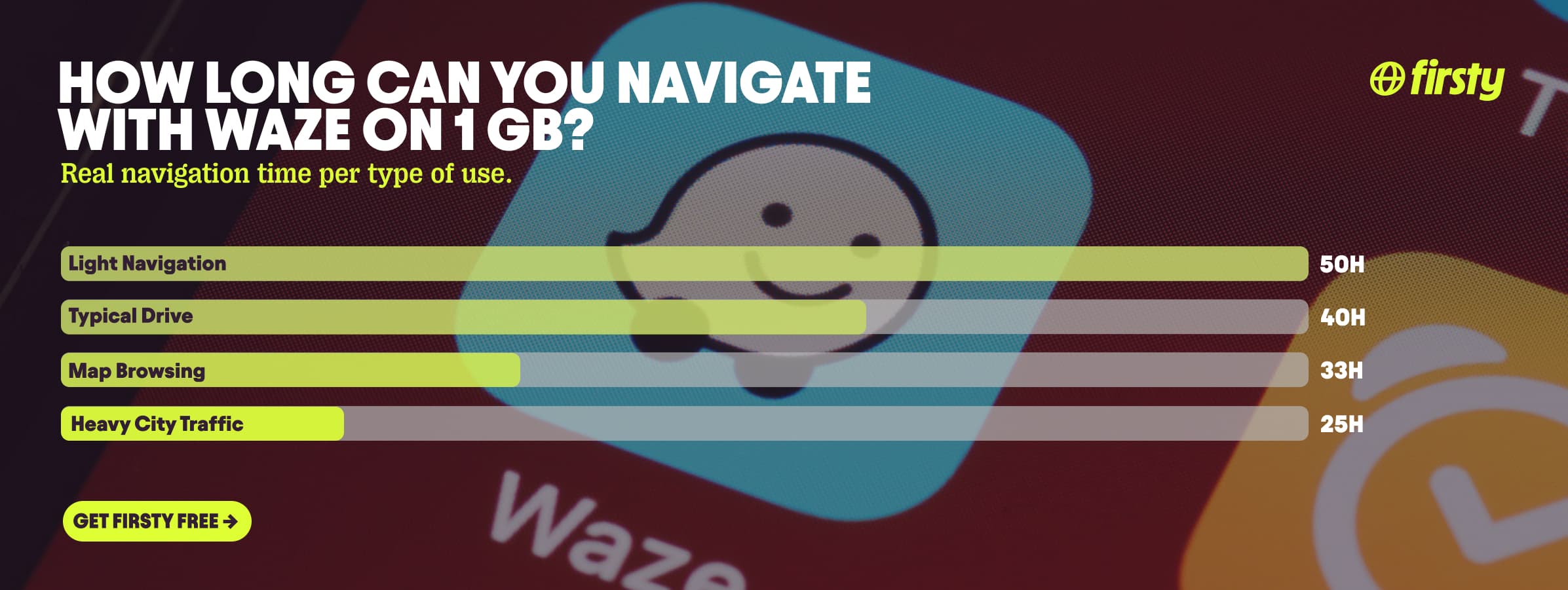
One gigabyte lasts roughly 40 hours of typical Waze navigation, and about 25 hours even in heavy city traffic. That is still a lot of driving, enough for a long road trip, but it is no longer the "drive for a month and barely dent it" story you get with Google Maps. If you navigate for hours every day, a single gigabyte will not cover a full month.
| How you use Waze | How long 1 GB lasts |
|---|---|
| Light, intermittent navigation (~20 MB/hour) | about 50 hours |
| Typical drive (~25 MB/hour) | about 40 hours |
| Map browsing and searches (~30 MB/hour) | about 33 hours |
| Heavy rerouting, busy city (~40 MB/hour) | about 25 hours |
Does Waze use a lot of data?
More than you would expect for a maps app. Waze uses around 20 to 30 MB an hour, more than Google Maps and Apple Maps, because it is constantly syncing live, crowd-sourced data: traffic, accidents, police reports, hazards, and now live EV charging availability and traffic-light timing. All of that is a steady stream of small updates flowing both ways, not the occasional map tile a standard navigation app pulls. What pushes it higher still is linking a music app like Spotify inside Waze, since that audio streams on top of navigation, leaving it rerouting for hours, or browsing the map a lot. It is still small next to video or music apps, but among navigation apps Waze is the heavy one.
Does Waze work without internet?
Not really. Waze has no offline maps and needs a live internet connection to navigate, reroute, search, and show live traffic. Unlike Google Maps, you cannot download an area to use later. There is one workaround: set your destination and start the route while you still have a connection, and Waze will keep guiding you along that cached route if you lose signal. But you lose rerouting, live traffic, hazard alerts, and search the moment you go offline, and as soon as you take a wrong turn or want a new destination, you need data again. This is exactly why a connection matters more than the data amount, especially abroad where roaming is often off.
Use Waze abroad without burning your data plan
If you are traveling or worried about your monthly data cap, there is a simpler answer than counting megabytes.
Firsty Free gives you mobile data in 185+ countries by watching short ads. Genuinely free, no payment required, no contract, no credit check.
Firsty Prepaid starts at €0.98/GB, buy data once, use it whenever. GBs never expire.
Firsty Unlimited is €2 to €3 per day or €49 per month for genuinely uncapped data. Stay on a video call with family for as long as you want and never watch the meter.
Most travel data plans charge you €10 to €15 per day in roaming. Your home carrier charges similar. Firsty is the alternative.
Already have Firsty? Open the app, install the eSIM, and you're connected, no number changes, no SIM swap.
How does Waze compare to other apps?
Waze is the heaviest of the mainstream navigation apps. It uses more data than Google Maps and Apple Maps, because it constantly syncs live, crowd-sourced traffic, hazards, and reports from other drivers. Even so, it is a small fraction of what video or music apps burn through: a full hour of Waze still uses less data than a single minute of Netflix in HD.
| App | Data per hour (heavy use) | Data per hour (light use) |
|---|---|---|
| Waze | ~40 MB (heavy city traffic, constant alerts) | ~20 to 30 MB (steady navigation) |
| Snapchat | ~360 MB (Stories, Spotlight) | ~20 MB (chat only) |
| TikTok | ~840 MB | ~280 MB |
| Netflix | 3 GB (1080p HD) | 300 MB (Save Data mode) |
| YouTube | 1.5 GB (720p) | 90 MB (144p) |
| Zoom / Teams | ~1.1 GB (1-on-1 HD video) | ~50 MB (audio only) |
| ~720 MB (scrolling) | n/a | |
| 480 MB (video call) | n/a | |
| FaceTime | ~250 MB (video call) | ~30 MB (audio call) |
| Spotify | 150 MB (Very High audio) | 40 MB (Normal audio) |
| Google Maps | ~30 MB (satellite view) | ~3 to 5 MB (standard navigation) |
Want the full picture for the other apps eating your data? Check the breakdowns for YouTube, Netflix, TikTok, Instagram, FaceTime, WhatsApp, Snapchat , Spotify , Zoom, and Google Maps. Waze is the heaviest navigation app on this list, but still lighter than anything built for video or music. The reason the data matters at all is that Waze, unlike Google Maps, cannot run offline.
How to reduce Waze data usage
Waze is the chattiest of the maps apps, so a few habits make a real dent.
Set your route before you leave while on WiFi. Waze caches it, so it pulls less once you are driving.
Close Waze fully when you are parked. Left open in the background, it keeps a small sync going.
Skip the in-app music player. Linking Spotify or similar streams audio on top of navigation, and that adds up fast.
Download voice packs and app updates on WiFi, not on the road. Waze's custom and celebrity voices are chunky one-time downloads, and grabbing one over cellular abroad is pure waste.
Stop zooming and panning the map out of habit. Every map move pulls fresh tiles.
How to check Waze data usage on iPhone and Android
To see exactly how much data Waze has used, check your phone's settings, not the app.
On iPhone: go to Settings, then Cellular or Mobile Data, scroll down to Waze, and you will see its total. Tap Reset Statistics at the bottom to start a fresh count.
On Android: go to Settings, then Network and internet, then app data usage, or Settings, then Apps, then Waze, then Mobile data, to see the figure.
Both let you compare Waze against your other apps, and with Waze you will usually find it sitting higher than your other maps apps.
Frequently asked questions
Does Waze use more data than Google Maps?
Yes. Waze uses more, around 20 to 30 MB an hour versus 3 to 5 MB for Google Maps in standard navigation. The reason is that Waze constantly syncs live, crowd-sourced traffic and reports, while Google Maps leans more on stored and historical data. Both are small next to streaming, but Waze is clearly the heavier of the two.
How much data does Waze use per month?
About 750 MB to 1 GB for a one-hour daily commute. Heavy daily drivers who navigate for hours can reach a few GB a month. It is still modest, but unlike Google Maps it is no longer a rounding error on your plan.
Does Waze download maps for offline use?
No. Waze does not let you download maps or areas for offline use, unlike Google Maps. The only offline trick is to start a route while connected and stay on it, but you lose rerouting, live traffic, and search the moment you go offline.
Why is Waze using so much data?
Waze is a two-way live data pipe. It constantly downloads crowd-sourced traffic, hazards, police reports, and now live EV charging and traffic-light data, while uploading your own position and reports. Add a linked music app or constant rerouting and it climbs further. That is why it runs heavier than a standard maps app, even though the total is still small.
Does Waze use more data on CarPlay or Android Auto?
No. Running Waze through CarPlay or Android Auto just mirrors the app to your car screen. The map and traffic data it pulls is identical, so your mobile data use is the same whether you look at your phone or the dash.
Does Waze work abroad without roaming?
Waze works in any country, but only if your phone has a live data connection, since it cannot navigate offline. Roaming is often switched off or charged by the day abroad, which is where a travel eSIM helps. Firsty Free gives you data in 185+ countries by watching a short ad, so Waze keeps routing without a roaming bill.


