
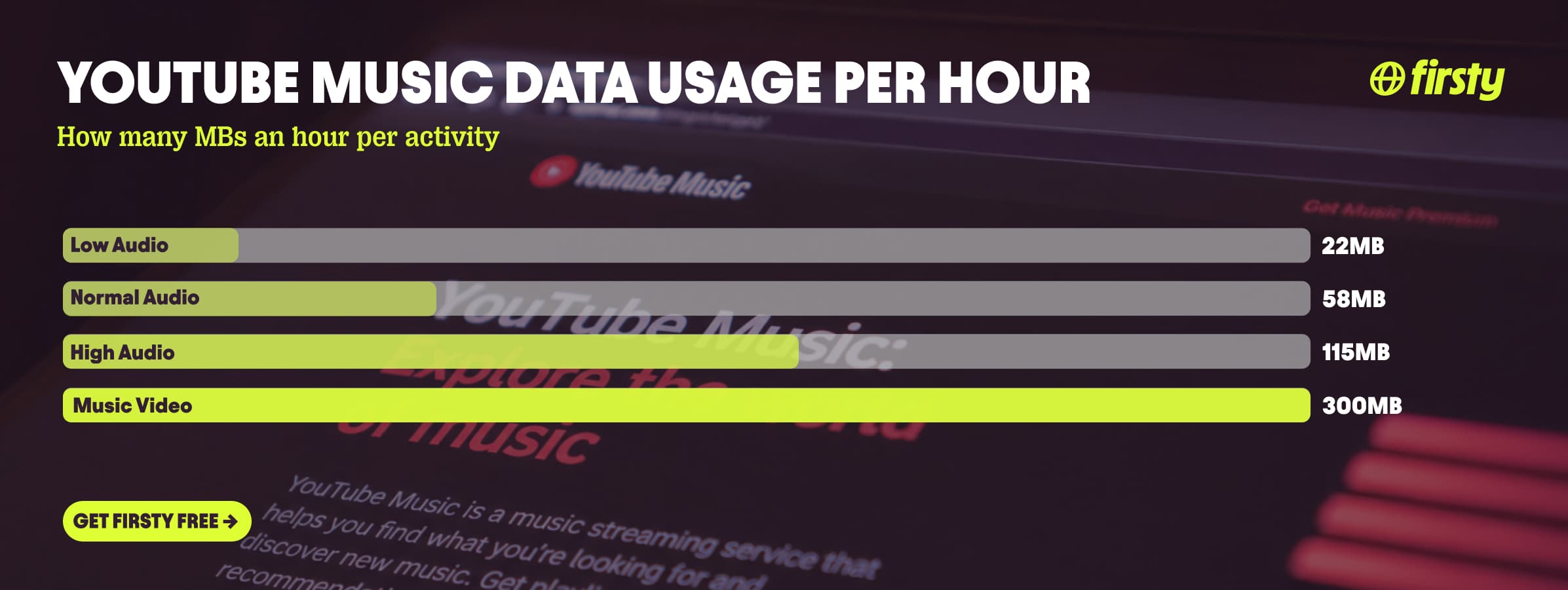
YouTube Music uses about 58 MB per hour at its default Normal quality (128 kbps), around 22 MB per hour on Low (48 kbps), and about 115 MB per hour on High (256 kbps), which only Premium unlocks. That is audio only. Here is the part most guides get backwards: paying is what lets you keep it light. Premium users can force audio-only mode and cap usage near 58 MB per hour. Free users get the music video for any track that has one and cannot switch it off, so video-heavy listening can run near 300 MB per hour, about five times the audio cost, with no toggle to stop it. The audio-only setting lives under Settings, Data saving, but it is a Premium feature. One gigabyte covers about 18 hours of normal listening, or only about 3 hours when videos play.
Streaming abroad is where this adds up fastest, and if you are on the free tier you cannot turn the video off, so the meter just runs. Firsty gives you mobile data in 185+ countries, and the Free plan costs nothing as long as you watch a short ad now and then.
Below is the full per-hour breakdown by quality, how far 1 GB really goes, why the app eats more than you expect, and how to cut it down.
On this page
How much data does YouTube Music use per hour?
YouTube Music uses about 22 MB per hour on Low, 58 MB per hour on Normal (the default), and 115 MB per hour on High, all for audio only. The setting lives under Settings, Data saving, Audio quality on mobile network.
| Quality setting | Bitrate | Per hour | Per minute |
|---|---|---|---|
| Low | 48 kbps | ~22 MB | ~0.4 MB |
| Normal (default) | 128 kbps | ~58 MB | ~1 MB |
| High (Premium) | 256 kbps | ~115 MB | ~1.9 MB |
| Music video (auto) | varies by resolution | ~300 MB | ~5 MB |
Free accounts are capped at Normal (128 kbps) for audio, but they also play the music video for any track that has one and can't switch it off, so a free user's real usage often lands near the video figure rather than the audio one. Premium unlocks High and, more importantly, the audio-only mode that lets you cap your data.
How long does 1 GB of data last on YouTube Music?
One gigabyte of data lasts about 18 hours of Normal-quality listening on YouTube Music, about 47 hours on Low, about 9 hours on High, and only about 3 hours if music videos are playing.
| What you're doing | Data per hour | Hours on 1 GB |
|---|---|---|
| Low audio (48 kbps) | ~22 MB | ~47 hours |
| Normal audio (128 kbps) | ~58 MB | ~18 hours |
| High audio (256 kbps) | ~115 MB | ~9 hours |
| Music videos (auto) | ~300 MB | ~3 hours |
So a long-haul flight's worth of audio, eight or nine hours on Normal, costs about half a gigabyte. Let the videos run for that same stretch and you would blow through nearly 3 GB.
Why does YouTube Music use so much data?
When YouTube Music feels heavy, it is almost always because it is streaming the music video, not just the audio. Audio on its own is light: about 58 MB per hour on the default Normal setting. Video plays at automatic quality and can reach about 300 MB per hour, the same as watching a regular YouTube clip.
This hits free users hardest. On the free tier YouTube Music plays the music video for any track that has one, and the audio-only toggle is locked behind Premium, so free listeners can't turn the video off. Premium is the opposite: it defaults to the audio track and lets you switch on audio-only and background play, which is what caps your data near 58 MB per hour. YouTube Music also plays videos at automatic quality with no resolution picker like the main YouTube app has, so it really is video on or video off, nothing in between. Hour for hour on audio, YouTube Music is about as light as Spotify. The video is the only reason it ever uses more.
Use YouTube Music abroad without burning your data plan
If you are traveling or worried about your monthly data cap, there is a simpler answer than counting megabytes.
Firsty Free gives you mobile data in 185+ countries by watching short ads. Genuinely free, no payment required, no contract, no credit check.
Firsty Prepaid starts at €0.98/GB. Buy data once, use it whenever. GBs never expire.
Firsty Unlimited is €2 to €3 per day or €49 per month for genuinely uncapped data. Stream on High or let every music video play, the meter never matters.
Most travel data plans charge you €10 to €15 per day in roaming. Your home carrier charges similar. Firsty is the alternative.
Already have Firsty? Open the app, install the eSIM, and you are connected, no number changes, no SIM swap.
How does YouTube Music compare to other apps?
YouTube Music sits at the light end for audio, about the same as Spotify hour for hour. The twist is that it can play video, and on the free tier you can't turn that off, so it quietly climbs out of music-app territory and into YouTube and Netflix territory.
| App | Data per hour (heavy use) | Data per hour (light use) |
|---|---|---|
| YouTube Music | ~115 MB (High, 256 kbps) | ~22 MB (Low audio) |
| Snapchat | ~360 MB (Stories, Spotlight) | ~20 MB (chat only) |
| TikTok | ~840 MB | ~280 MB |
| Netflix | 3 GB (1080p HD) | 300 MB (Save Data mode) |
| YouTube | 1.5 GB (720p) | 90 MB (144p) |
| Zoom / Teams | ~1.1 GB (1-on-1 HD video) | ~50 MB (audio only) |
| ~720 MB (scrolling) | n/a | |
| 480 MB (video call) | n/a | |
| FaceTime | ~250 MB (video call) | ~30 MB (audio call) |
| Spotify | 150 MB (Very High audio) | 40 MB (Normal audio) |
| Google Maps | ~20 MB (satellite view) | ~5 MB (navigation) |
Want the full picture for the other apps eating your data? Check the breakdowns for Snapchat, TikTok, Netflix, YouTube, Zoom and Teams, Instagram, WhatsApp, FaceTime, Google Maps and Spotify. The table above shows YouTube Music's audio numbers; keep it audio only and it's as light as Spotify, but a free account playing music videos pushes closer to 300 MB per hour, deep into YouTube territory.
How to reduce YouTube Music data usage
Force audio-only mode. Under Settings, Data saving, turn on "Don't play music videos." This is the single biggest saver, dropping a video track from about 300 MB per hour to under 60. Note that this is a Premium feature; free users can't switch the video off, so their only real lever is managing total data.
Set audio quality to Normal or Low on mobile. Settings, Data saving, Audio quality on mobile network. Low (48 kbps) uses about 22 MB per hour and still sounds fine for podcasts and background listening.
Turn on Smart Downloads or download playlists on Wi-Fi (Premium). Smart Downloads automatically saves your most-played tracks over Wi-Fi so they play with zero mobile data, which is the safest setup for travel.
Turn on "Stream via Wi-Fi only" so you never touch your mobile data by accident.
Stop the autoplay queue when you're done. It keeps streaming after your playlist ends and can quietly run for hours.
How to check YouTube Music data usage on iPhone and Android
You can't see per-app data inside YouTube Music itself, so check it in your phone's settings.
On iPhone, go to Settings, Mobile Data (or Cellular), then scroll down to YouTube Music to see how much it has used this period. Tap "Reset Statistics" at the start of each billing cycle so the number stays accurate.
On Android, go to Settings, Network and internet, SIMs, App data usage (the exact path varies by manufacturer), then tap YouTube Music. You can also set a data warning or limit here so your phone alerts you before you run out.
Frequently asked questions
Does YouTube Music use a lot of data?
It can, and the free tier is the heavy one. Free accounts play the music video for any track that has one and can't switch to audio-only, so usage can run near 300 MB per hour. Premium users can force audio-only and cap it around 58 MB per hour.
Does YouTube Music use more data than Spotify?
Hour for hour on audio they are close: YouTube Music uses about 58 MB on Normal and 115 MB on High, while Spotify uses about 40 MB on Normal and 150 MB on Very High. YouTube Music only uses noticeably more when it plays the music video instead of the audio, which free users can't avoid.
Does YouTube Music use less data than YouTube?
On audio, yes, by a lot. Audio-only YouTube Music runs about 22 to 115 MB per hour, while YouTube video uses around 360 MB per hour at 480p and up to 4.8 GB at 4K. But if YouTube Music is playing the music video, the two are basically the same.
How much data does YouTube Music use per song?
About 3 to 4 MB for a typical 3 to 4 minute song on Normal quality, since it uses roughly 1 MB per minute. On High it is closer to double that, and the music video version of a song can use 15 to 20 MB.
Does audio-only mode use less data on YouTube Music?
Yes, but it's a Premium feature. Premium lets you force the "Song" version or turn on "Don't play music videos," which drops usage from around 300 MB per hour to under 60. On the free tier you can't switch a music video off, so free users often use more, not less.
Can I use YouTube Music offline to save data?
Yes, with Premium. Download your playlists over Wi-Fi, or turn on Smart Downloads to do it automatically, and they play with zero mobile data. This is the most reliable way to listen abroad without touching your plan.
How much data do podcasts use on YouTube Music?
Less than music videos. Podcasts on YouTube Music are audio-led, so they sit near the Low to Normal tiers, roughly 22 to 58 MB per hour, unless a video version is set to play. There is a separate "Don't play podcast videos" toggle under Data saving to keep them audio only.


