
Discord uses about 30 MB of data per hour for a voice call, which is barely anything. Text chat uses even less, under 5 MB per hour. The numbers only get big when you turn on video or share your screen. A one on one video call runs about 270 MB per hour, a group video call 500 to 700 MB, and screen sharing or Go Live streaming at 720p eats roughly 1.5 GB per hour, more than Netflix in HD. So the honest answer is that Discord is light if you stick to voice and text, and heavy the moment you stream. On 1 GB you get about 33 hours of voice chat, just under 4 hours of one on one video, or about 40 minutes of screen sharing. If most of your time is spent talking in voice channels, Discord will hardly touch your data plan.
Traveling and worried about the data? You can use Discord abroad without paying for roaming at all. Firsty Free gives you mobile data in 185+ countries by watching a short ad, no contract and no payment.
Below is the full breakdown by activity, how far 1 GB really goes, how Discord stacks up against other apps, and how to cut your usage.
On this page:
How much data does Discord use per hour?
Discord uses about 30 MB per hour for voice and under 5 MB per hour for text, but video and screen sharing push that to between 270 MB and 1.5 GB per hour. Here is the breakdown by activity:
| Activity | Data per hour |
|---|---|
| Text chat and idle | 1 to 5 MB |
| Voice call (default quality) | ~30 MB |
| Voice call (higher bitrate or boosted server) | up to ~60 MB |
| One on one video call | ~270 MB |
| Group video call | 500 to 700 MB |
| Screen share or Go Live (720p, free) | ~1.5 GB |
| Go Live at 1080p 60fps (Nitro) | 2 to 3 GB |
Discord does not publish official figures, so these come from its bitrate settings and recent real world tests. Your exact number depends on call quality, how many people have their camera on, and your stream resolution.
How long does 1 GB of data last on Discord?
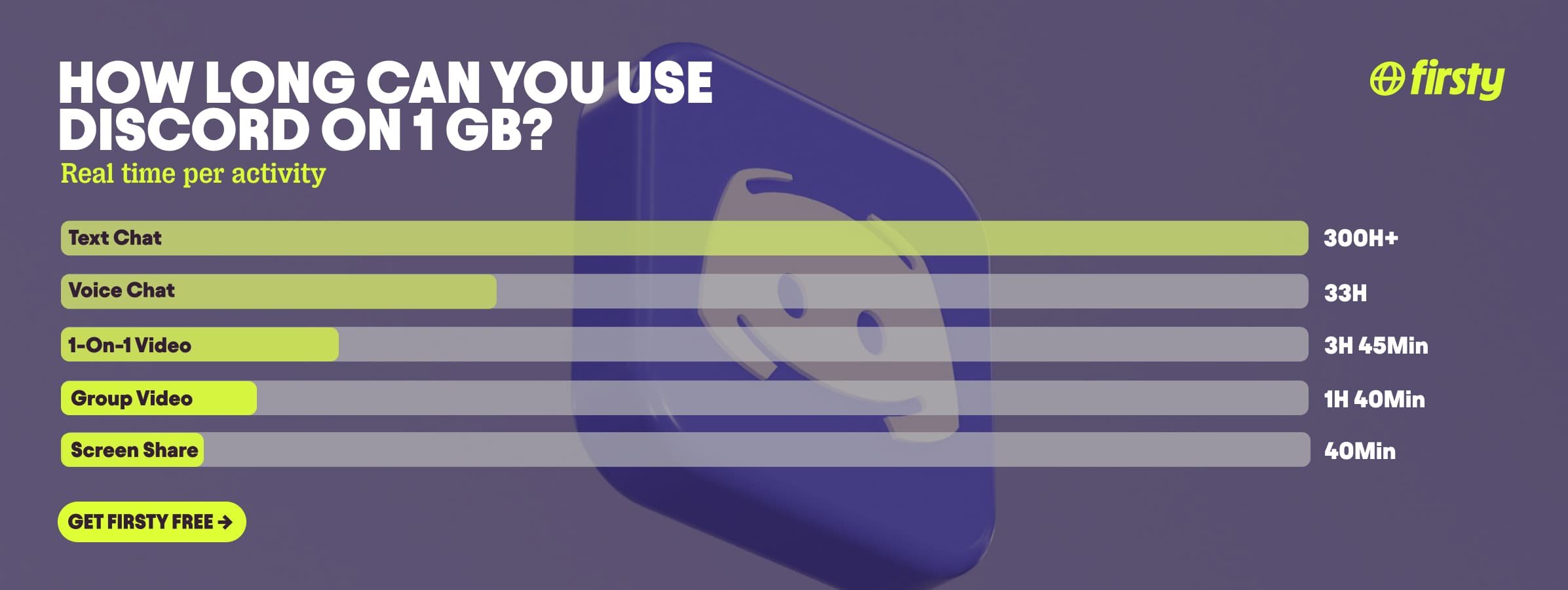
On 1 GB you get roughly 33 hours of voice chat, just under 4 hours of one on one video, or about 40 minutes of screen sharing at 720p. Text only chat is effectively unlimited. Here is how far 1 GB goes by activity:
| Activity | How long 1 GB lasts |
|---|---|
| Text chat only | 300+ hours |
| Voice chat | ~33 hours |
| One on one video call | ~3 hours 45 min |
| Group video call | ~1 hour 40 min |
| Screen share or Go Live (720p) | ~40 minutes |
The gap is huge: 1 GB is a full work week of voice calls, or under an hour of streaming. What you do on Discord matters far more than how long you do it.
Why does Discord use so much data?
Discord only uses a lot of data when you stream video or share your screen, not when you chat. Voice and text are tiny because Discord sends compressed audio at a low bitrate, around 64 kbps, which is roughly 30 MB an hour. Video and Go Live send a live picture many times a second, and that is where the gigabytes come from.
Two things push it higher. The first is more cameras on at once in a group call, since each video feed is counted separately. The second is stream resolution. Free accounts cap Go Live at 720p and 30fps, so the worst case is around 1.5 GB per hour. Nitro unlocks 1080p, 60fps and even 4K, which can double or triple that. Watching someone else's stream costs you the same as sending one, so a busy voice channel with a few people streaming adds up fast.
Use Discord abroad without burning your data plan
If you are traveling or worried about your monthly data cap, there is a simpler answer than counting megabytes.
Firsty Free gives you mobile data in 185+ countries by watching short ads. Genuinely free, no payment required, no contract, no credit check.
Firsty Prepaid starts at €0.98/GB, buy data once, use it whenever. GBs never expire.
Firsty Unlimited is €2 to €3 per day or €49 per month for genuinely uncapped data. Stream, screen share and stay in voice all day without watching the meter.
Most travel data plans charge you €10 to €15 per day in roaming. Your home carrier charges similar. Firsty is the alternative.
Already have Firsty? Open the app, install the eSIM, and you're connected, no number changes, no SIM swap.
How does Discord compare to other apps?
Discord has the widest range of any app on this list. Stick to voice and text and it is one of the lightest things on your phone, lighter than Spotify or Google Maps. Turn on screen sharing and it jumps past Netflix and YouTube to become one of the heaviest. Few apps swing that far.
| App | Data per hour (heavy use) | Data per hour (light use) |
|---|---|---|
| Discord | ~1.5 GB (screen share, Go Live 720p) | ~30 MB (voice and text chat) |
| Snapchat | ~360 MB (Stories, Spotlight) | ~20 MB (chat only) |
| TikTok | ~840 MB | ~280 MB |
| Netflix | 3 GB (1080p HD) | 300 MB (Save Data mode) |
| YouTube | 1.5 GB (720p) | 90 MB (144p) |
| Zoom / Teams | ~1.1 GB (1-on-1 HD video) | ~50 MB (audio only) |
| ~720 MB (scrolling) | n/a | |
| 480 MB (video call) | n/a | |
| FaceTime | ~250 MB (video call) | ~30 MB (audio call) |
| Spotify | 150 MB (Very High audio) | 40 MB (Normal audio) |
| Google Maps | ~20 MB (satellite view) | ~5 MB (navigation) |
Want the full picture for the other apps eating your data? Check the breakdowns for Roblox, Clash Royal, YouTube, Netflix, TikTok, Instagram, FaceTime, WhatsApp, Snapchat , Spotify , Zoom, and Google Maps. Discord stays lighter than all of them for everyday voice and text, but a single hour of screen sharing uses more than any of them.
How to reduce Discord data usage
The fastest way to cut Discord data is to turn on Data Saving Mode and keep video and screen sharing off mobile. Here are the changes that actually move the needle:
Turn on Data Saving Mode. Tap your avatar to open Settings, go to Text and Media, and scroll to Data Consumption to switch it on. On cellular this compresses images to 360p and lowers video upload quality.
Stay on voice instead of video. Voice is about 30 MB per hour against roughly 270 MB for a video call.
Turn off auto-download and link previews. Under Settings, in Text and Media, stop images, GIFs and videos from downloading automatically and switch off website link previews, which pre-load images and pages whenever someone drops a link.
Turn off animated emojis and stickers. Under Accessibility, stop emojis and stickers from animating so they don't loop and pull data while you scroll.
Drop your stream quality. If you Go Live, set it to 480p or 720p rather than 1080p or higher.
Save screen sharing and group video for wifi. These are the only things that use real data.
Skip watching other people's streams on mobile. Watching a Go Live downloads as much as streaming it yourself.
How to check Discord data usage on iPhone and Android
Discord does not show a built-in data total, so check it in your phone settings.
On iPhone: open Settings, tap Cellular or Mobile Data, then scroll down to Discord to see how much it has used in the current period.
On Android: open Settings, go to Network and Internet, then Data usage or App data usage, and find Discord in the list.
The exact path varies by phone, but every Android lists per-app data somewhere under network settings.
Frequently asked questions
Does Discord use a lot of data?
No, not for normal use. Voice and text chat use about 30 MB and under 5 MB per hour, so a full day of talking barely registers. It only becomes data heavy when you turn on video or share your screen, which can hit 1.5 GB per hour.
How many GB does Discord use per hour?
For voice and text, well under 0.1 GB per hour. A one on one video call uses about 0.27 GB, a group call 0.5 to 0.7 GB, and screen sharing or Go Live at 720p around 1.5 GB per hour.
Does Discord use data in the background?
Very little. When the app is open but idle it uses a few MB per hour to stay connected and show who is online. Closing the app stops almost all of it, and background notifications use a negligible amount.
Does Discord use more data on a PC than on a phone?
The activity matters more than the device. The same voice call or stream uses roughly the same data on PC and mobile. Desktop streams often default to a higher resolution though, and that uses more.
Does Discord voice chat use a lot of data?
No. A voice call uses about 30 MB per hour at default quality, so 1 GB covers around 33 hours of talking. Boosted servers and higher bitrates can push it toward 60 MB per hour, which is still light.
Does Discord use more data than WhatsApp?
For calls they are close. A WhatsApp video call is about 480 MB per hour and a Discord one on one video call about 270 MB. Discord voice is much lighter than either, but the gap closes fast once you stream or share your screen on Discord.
Why is my Discord text chat using more data than expected?
Pure text uses almost nothing, but most servers are not just text. Auto-playing GIFs, high-resolution images, custom animated emojis and link previews all load as you scroll, which can push a busy server to tens of MB per hour. Turn on Data Saving Mode to stop most of that media from auto-loading.


