Roblox uses about 100 to 300 MB of data per hour on mobile, with most gameplay landing around 150 MB per hour. Simple experiences with Data Mode on can drop to 50 to 100 MB per hour, while busy multiplayer servers with high graphics and voice chat can climb to 500 to 600 MB per hour. That makes Roblox a light-to-moderate data app: heavier than music streaming or maps, but far lighter than video apps like YouTube or Netflix. The biggest spikes come from joining new experiences, where your device downloads the game's assets, from busy servers, and from voice chat, which adds 20 to 40 MB per hour. One gigabyte of data covers roughly 6 to 7 hours of typical Roblox, or up to 10 hours on the lightest settings.
If your kid plays Roblox on a tablet abroad or you are tethering on a road trip, those hours add up to real data. Firsty gives you mobile data in 185+ countries, and you can start free by watching a short ad.
Below: the full per-hour breakdown, how far 1 GB really goes, why usage jumps in some games, and how to cut it down.
On this page:
How much data does Roblox use per hour?
Roblox uses around 100 to 300 MB per hour for typical gameplay, about 150 MB per hour on average. What you actually use depends on the experience, the server, your graphics settings, and whether voice chat is on.
Roblox activity or setting | Data per hour |
|---|---|
Simple experience, Data Mode on, low graphics | 50 to 100 MB |
Typical gameplay | 100 to 300 MB |
Busy multiplayer server, high graphics | 300 to 500 MB |
Big server (30v30 style) or constant new joins | up to 600 MB |
Voice chat (added on top) | plus 20 to 40 MB |
In practice, slower experiences with smaller maps, like Brookhaven or Adopt Me once they have loaded, sit near the light end. Fast, busy, asset-heavy games like BedWars or Jailbreak sit toward the top. The more players, effects, and asset loading happening around you, the more data Roblox pulls.
How long does 1 GB of data last on Roblox?
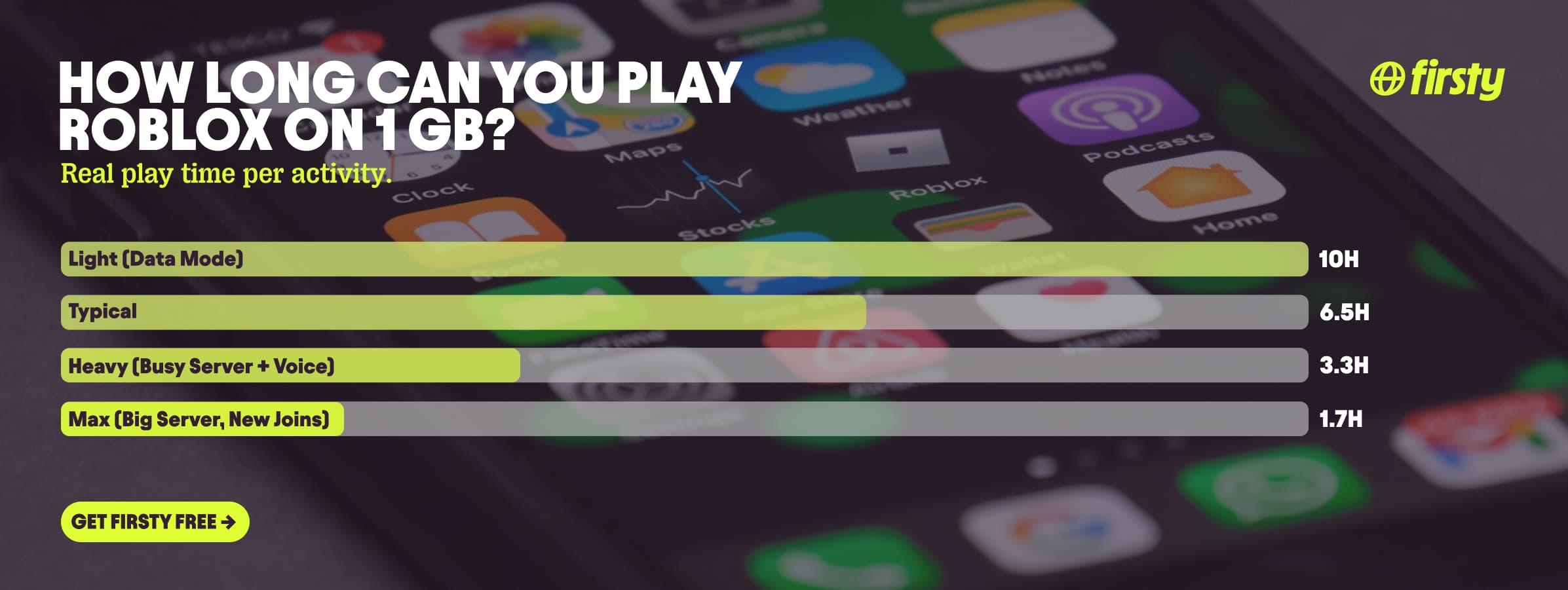
One gigabyte of data lasts about 6 to 7 hours of typical Roblox, up to 10 hours on the lightest settings, and as little as under 2 hours in a busy server with voice chat. For casual play, 1 GB goes a long way.
Play style | Roughly | 1 GB lasts |
|---|---|---|
Light (simple game, Data Mode) | ~100 MB/hr | ~10 hours |
Typical | ~150 MB/hr | ~6.5 hours |
Heavy (busy server plus voice) | ~300 MB/hr | ~3.3 hours |
Max (big server, constant new joins) | ~600 MB/hr | ~1.7 hours |
Why does Roblox use so much data sometimes?
Roblox usually does not use much data, but it spikes when you join a new experience, play on a busy server, or turn on voice chat. Every experience streams textures, sounds, models, and avatars to your device in real time, so the first time you join something new, your phone downloads its assets and usage jumps. After that, repeat sessions are lighter because a lot of it is cached.
One catch: if you clear the app's storage or reinstall to free up space, Roblox has to re-download everything the next time it loads, which can cost more than a full hour of play.
More players on a server means more positions, actions, and chat to sync, and voice chat adds a steady stream of audio on top. Higher graphics settings load more detail again. None of this is a problem on Wi-Fi, but on cellular it is the difference between 60 MB and 600 MB in an hour.
Play Roblox abroad without burning your data plan
If you are traveling or worried about your monthly data cap, there is a simpler answer than counting megabytes.
Firsty Free gives you mobile data in 185+ countries by watching short ads. Genuinely free, no payment required, no contract, no credit check.
Firsty Prepaid starts at €0.98/GB, buy data once, use it whenever. GBs never expire.
Firsty Unlimited is €2 to €3 per day or €49 per month for genuinely uncapped data. Long FaceTime calls, group calls, HD video on 5G, none of it touches a cap.
Most travel data plans charge you €10 to €15 per day in roaming. Your home carrier charges similar. Firsty is the alternative.
Already have Firsty? Open the app, install the eSIM, and you're connected, no number changes, no SIM swap.
How does Roblox compare to other apps?
Roblox sits on the lighter side. It is heavier than music streaming and navigation, lighter than full-screen video like YouTube and Netflix, but a busy server with voice chat closes the gap fast.
App | Data per hour (heavy use) | Data per hour (light use) |
|---|---|---|
Roblox | ~300 MB (busy server, voice chat) | ~60 MB (simple game, Data Mode) |
Snapchat | ~360 MB (Stories, Spotlight) | ~20 MB (chat only) |
TikTok | ~840 MB | ~280 MB |
Netflix | 3 GB (1080p HD) | 300 MB (Save Data mode) |
YouTube | 1.5 GB (720p) | 90 MB (144p) |
Zoom / Teams | ~1.1 GB (1-on-1 HD video) | ~50 MB (audio only) |
~720 MB (scrolling) | n/a | |
480 MB (video call) | n/a | |
FaceTime | ~250 MB (video call) | ~30 MB (audio call) |
Spotify | 150 MB (Very High audio) | 40 MB (Normal audio) |
Google Maps | ~20 MB (satellite view) | ~5 MB (navigation) |
Want the full picture for the other apps eating your data? Check the breakdowns for YouTube, Netflix, TikTok, Instagram, FaceTime, WhatsApp, Snapchat , Spotify , Zoom, and Google Maps. Roblox stays lighter than the video-heavy ones for everyday play, but a long session on a packed server with voice chat on closes the gap fast.
How to reduce Roblox data usage
The fastest way to cut Roblox data use is to turn on Data Mode and lower Graphics Quality, which together can roughly halve your usage.
Turn on Data Mode in Roblox settings. It loads simpler versions of other players' avatars, which cuts a lot of the streaming.
Set Graphics Mode to Manual and drag Graphics Quality down to level 1 or 2. The world looks blockier, the data savings are large.
Turn off voice chat on cellular. That alone saves 20 to 40 MB per hour.
Turn off Wi-Fi Assist on iPhone, or auto-switch to mobile data on Android, before you travel. Otherwise the phone silently jumps to cellular when hotel or cafe Wi-Fi gets weak, and that is how parents get a surprise bill.
Play on the phone or tablet app rather than tethering a laptop, since a bigger screen at higher graphics can pull more data.
Download Roblox and game updates on Wi-Fi, not on data. Fresh installs and updates are the biggest single spikes.
On iPhone, turn on Low Data Mode. On Android, turn on Data Saver and restrict background data for Roblox.
How to check Roblox data usage on iPhone and Android
On iPhone, go to Settings, then Cellular, and scroll down to Roblox to see its usage.
On Android, go to Settings, then Network and internet, then Data usage, then App data usage, and select Roblox.
To measure your real per-hour rate, reset the statistics before you play, do a one-hour session, then check the number. That gives you a far more accurate figure than any estimate, because it reflects the exact games you play.
Frequently asked questions
How many GB does Roblox use per hour?
Roblox uses about 0.1 to 0.3 GB per hour, which is 100 to 300 MB, not full gigabytes. Only a busy multiplayer server with voice chat and high graphics pushes it toward 0.5 to 0.6 GB per hour. For most play, you will use well under half a gigabyte an hour.
Is 1 GB of data enough for Roblox?
Yes. One gigabyte is enough for roughly 6 to 7 hours of typical Roblox, or up to 10 hours on the lightest settings. A heavy session on a packed server with voice chat burns through it faster, in about 3 hours. For casual play, 1 GB lasts a long time.
Does Roblox use a lot of data?
No, Roblox uses a moderate amount, around 100 to 300 MB per hour, far less than streaming video. It only feels heavy over long daily sessions, where a couple of hours a day can add up to 12 to 18 GB per month. The per-hour rate is light, the monthly total depends on how long you play.
How much data does Roblox use per minute?
Roblox uses roughly 2 to 5 MB per minute during typical gameplay, based on the 100 to 300 MB per hour range. A busy server with voice chat can push that to around 8 to 10 MB per minute. A quick five-minute session barely registers.
Does Roblox use data in the background?
Yes, Roblox can use a small amount of data in the background for updates and connections, especially on mobile. To stop it, restrict background data for Roblox on Android, or turn off cellular access for the app on iPhone. Running updates on Wi-Fi avoids the biggest background drains.
Does Roblox voice chat use more data?
Yes. Voice chat adds about 20 to 40 MB per hour because audio is streamed continuously while you talk and listen. On a limited plan, turning voice chat off on cellular is an easy saving. It is one of the few features that noticeably raises Roblox's hourly usage.
Is 50 GB a lot of data for gaming?
For Roblox, yes, 50 GB is a lot. That is over 150 hours of typical gameplay, which most casual players never reach in a month. If you are tethering or sharing data across a family, a free or unlimited plan removes the worry entirely.